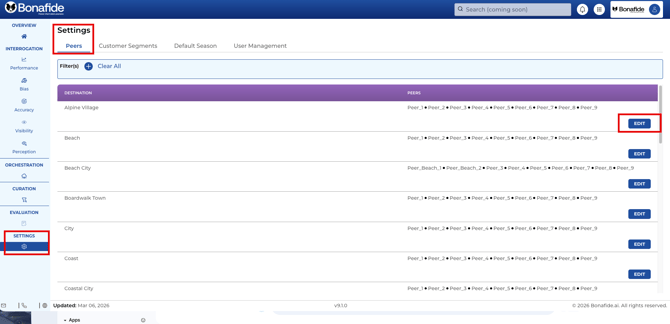
Competitor sets (frequently referred to as "compsets" or "peers" in the platform) are lists of rival properties or destinations that travelers would consider as alternatives to your brand.
In the Bonafide platform, these sets are essential for benchmarking. They are used to calculate core metrics—specifically Performance, Bias, and Perception modules only—by comparing your brand's AI visibility directly against these competitors. For example, the Performance score shows how often your brand lands in the top five AI recommendations compared to the average performance of your compset.
Where Competitor Sets are Located and Managed:
- The Client Onboarding Sheet: During the initialization phase, your compset is located in a shared Google Sheet called the Client Onboarding Sheet, specifically on the "property level" tab.
- Automatic Pre-filling: Bonafide automatically pre-fills this compset data by actively asking the Large Language Models who they consider to be your brand's top competitors.
- Customization: You are not locked into the AI's assessment. While reviewing the onboarding or initialization spreadsheet, brands can manually edit the list—dropping competitors you don't find relevant or adding different peers—to ensure the platform measures your performance against your actual desired compset.
UPDATING COMPETITORS, COMP SET OR PEERS
After initialization, comp sets can actively be updated, changed, and added in the SETTINGS module by the Administrator of Manager of your Bonafide instance.
See Related Article: How to Update, Edit and Add Peers (Competitor Sets)