
Release Date: April 1, 2026
Overview:
This latest release introduces significant enhancements to the Bonafide UI across multiple areas, including the Reporting, Settings, Orchestration, and Curator modules. Key updates include refined user management controls, test-group-specific download restrictions, and a new time series graph view for visualizing historical data. Additionally, the Curator module receives expansive updates featuring new tracking columns, advanced search and filter capabilities for hidden data, and new delegate unassignment logic to better assist with workflow management.
New Features & Enhancements
Settings Module:
User Management Module
The User Management System Guide provides users and administrators to control team access and maintain account security within the Bonafide platform. Accessible through the Settings section, the system requires administrators to first whitelist specific email domains before adding new team members to prevent unauthorized access from external or unverified domains. When adding a user, administrators must assign specific roles—such as Default (Admin), Curator Manager, or Delegate—and can manually customize access to various platform modules like Curator, Orchestration, and Performance.
Finally, once the invitation is finalized, the system sends an automated email allowing the user to log in and access authorized modules, while administrators can continue to monitor completion progress for users assigned as delegates.
More Info
Custom Segments (Add, Edit, Delete, Revise)
Orchestration:
Test & Control Group Download Restrictions
For customers utilizing Test & Control groups, download functionalities have been refined to ensure data accuracy.
- Feature: The orchestration download feature is now restricted exclusively to "test" groups/properties.
- Logic: Customers attempting to download will see a message reading: "Downloads are limited to test group".
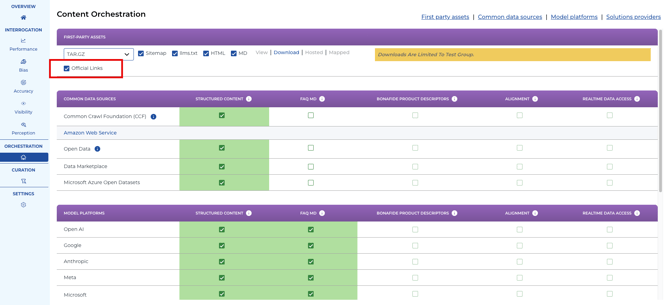
Orchestration of Official Links: Can be EXCLUDED from FAQ Package
Official Links can now be turned off and not be added into the FAQ Package files for download. Official Links are default to ON but the checkbox option to turn off is now available by unchecking the Official Link tick box.
CURATOR
Curator Module: Additional Tracking Columns
New columns have been introduced to improve tracking of official responses and verification metrics.
- Feature: Five additional columns are now in production including:
- Official Response Updated Timestamp
- Official Response Updated By
- Official Response Original Source
- Verified Update Timestamp
- Verified By
- How to Use: These columns are hidden by default but are available by clicking the "Select Columns" icon in the upper right corner of the screen view.
- A new date-time selector has been implemented for the "Official Response Update Timestamp" column (remaining timestamp columns will receive this functionality soon).
Curator Module: Advanced Search and Filtering
Filter functionalities have been expanded to streamline data auditing.
- Feature: Search/filter functionality has been enabled for key columns:
- Truth
- Truth Update Timestamp
- Truth Update By
- Consensus
- Consensus Support (% of LLMs noting a reply equal to the Official Response)
- All 5 LLM ‘results’ columns
- How to Use: These columns are hidden by default but are available by clicking the "Select Columns" icon in the upper right corner of the screen view.
Curator Module: Delegate Unassignment
Users now have greater flexibility in managing and tracking delegate assignments.
- Feature: The Delegate "unassignment" feature allows users to remove delegates from specific records.
- How to Use: Unassign delegates directly from records in the Curator spreadsheet view. Users can also see the total number of unassigned records in the Chart ‘view’ (grouped by: Delegates).
Historical Modules: Time Series Graph View
A new graphical view is now available to better visualize and track historical data over time.
- Feature: Implementation of a time series line chart graph view.
- Supported Modules: Available for all historical data across Performance, Perception, Accuracy/Knowledge, and Visibility.
Bonafide API Key Integration
The new Bonafide API Key feature empowers travel brands to seamlessly connect external applications, custom websites, or MCP servers directly to the Bonafide platform without needing to manually log into the web interface. By generating secure, time-bound authentication keys, users can establish targeted, read-only access to vital data endpoints—including Curation, Orchestration, Perception, Performance, Account, and Accuracy metrics. This robust functionality enables development teams to automate data retrieval and deeply integrate their verified, AI-aligned knowledge base right into their own internal tech stacks and services. More