How often is your brand being recommended against your peers by LLMs
What is Performance in Bonafide?
In the Bonafide platform, Performance is a core metric that measures how frequently your specific travel brand (such as a hotel or destination) appears in the result set when a Large Language Model (LLM) is prompted by a user for travel recommendations.
Here is a detailed breakdown of how the Performance metric works:
The "Top 50%" Benchmark The primary benchmark for Performance is whether your brand shows up in the top 50% recommendations. Generative AI tools typically provide a very limited number of suggestions—usually between two and seven, with three to five being the most common. If your brand lands within this top 50%,the system considers it to be successfully "recommended" and "visible".
Competitive Peer Comparison Performance tells you exactly how well your brand is doing compared directly to its competitors, which is often referred to as its "comp set" or peer group. For example, if a destination or hotel scores above 50%, it is generally considered "Fair" with the average performance across comparative sets typically sitting around 58%.
Data Gathering Methodology To gather this data, Bonafide does not just ask a single AI model. Instead, it interrogates a panel of multiple different LLMs or Large Language Models to get a comprehensive view. Crucially, the platform ensures it is always testing against the very latest, most advanced versions of these models (e.g., immediately updating to new versions of ChatGPT or Gemini as they are released) so the insights remain highly relevant.
Strategic Breakdowns by Customer Segment Performance isn't just one broad score. The platform breaks down the performance data by specific traveler types or customer segments, such as luxury travelers, budget travelers, solo travelers, families, or "bleisure" travelers. This detailed breakdown is designed to help brands plan strategically:
If a luxury hotel is scoring poorly with "budget travelers," that makes sense and isn't a concern.
However, if a brand scores below average for its primary target demographic, it highlights exactly where they need to focus their data optimization efforts.
Conversely, if a brand unexpectedly performs very well with a specific segment (like family travelers), it can expose a new, highly visible market opportunity.
Score Fluctuations It is normal for Performance scores to fluctuate over time. Because the overall Performance number is an average across different customer segments, changing the filters to view different traveler types will instantly change the score. Additionally, scores will naturally shift when AI companies release new model updates (such as moving from ChatGPT-4.0 to 5.0) or change where their crawlers gather information.
3.1 What the Performance Score Means
Score Range
Stage Description
0 – 40%: Starting Stage
AI platforms are largely unaware of your brand or favor competitors. Significant opportunity to improve visibility through content and curation work.
41 – 60%: Growing Stage
AI is beginning to recognize your brand. Recommendations are inconsistent across platforms and query types.
61 – 79%: Established Stage
Strong AI presence but room to close the gap. Some question categories and platforms still underperforming.
80%+: Excellent Stage
Your brand is a consistently recommended option across AI platforms. The target for all brands.
TRAINING INSIGHT: A Typical Portfolio
Client brand portfolios commonly show Performance scores ranging from approximately 59% to 67% across brands — placing most brands in the Established stage. The target is 80%+. Portfolio-level averages give leadership a quick read on overall AI visibility health, while brand-level breakdowns identify where to focus resources.
3.2 Reading the Performance Dashboard
At the portfolio level, a horizontal bar chart shows each brand's Recommendation Frequency, color-coded by stage. At the brand level you see:
Your brand's score vs. each individual AI platform (ChatGPT, Gemini, Perplexity, Meta, Claude)
Your brand's score vs. comp set peers
Breakdown by Customer Segment — how often AI recommends you to different traveler types
Trend over time — are scores improving month over month?
3.3 Platform-Level Differences
Performance varies significantly by AI platform. [Brand] may score 90% on ChatGPT but only 45% on Meta AI. This is normal — each platform has different training data, update frequencies, and recommendation logic. Platform-level differences guide where to prioritize content work.
3.4 Filtering by Customer Segment
A brand might score 65% overall but 90% with luxury leisure travelers and only 40% with corporate business travelers — revealing a strong brand identity for one segment and a gap in positioning for another. Use Customer Segment filters to uncover and act on these nuances.
3.5 Performance Insight Framework
Stage labels (Starting, Growing, Established, Excellent) are directional descriptors — not universal goals. A resort in a low-competition market may reach its realistic ceiling at 60%, while an high-visibility flagship brand may reach 90%. Never cite a stage label as an absolute target. Instead, frame all insights around:
Month-over-month trajectory — is the score moving in the right direction?
Brand-to-brand comparisons — which brands lead vs. lag within the portfolio?
Platform-to-platform gaps — where is performance strong vs. weak across ChatGPT, Gemini, Perplexity, Meta, and Claude?
Meta Llama (Meta AI) consistently shows the lowest sourcing accuracy of all tracked platforms — a structural gap not solely addressable through content work. When flagging a Meta Llama lag in a client report, note this platform-level characteristic alongside any brand-specific explanation.
"Performance at 60.0% reflects current AI recommendation frequency — Orchestration and Curation are the levers to move this score over the coming monthly cycles."
TRAINING INSIGHT: Comp Set Comparison
It is common to see [Brand] rank first overall in GenAI platforms, while Brand Y outperforms in the "luxury leisure" segment specifically. The Peers view in the Performance module surfaces exactly these gaps. Use it to identify where a competitor is winning travelers you should be capturing.
The Performance Module: Measuring Recommendation Frequency
The Performance Module is the foundational screen when reviewing your data/content, providing actionable insights to optimize content and brand.
The measurement specifically focuses on whether your brand/product appears in the top five recommendations. Generative AI tools typically provide two to seven suggestions, with three to five being more common, meaning that if a travel brand makes it into the top five, it is considered recommended and visible.
Performance Benchmarks
Score Definition
Meaning
Average Score
Average performance across travel brands in a competitive set.
"Good" Threshold
A travel brand scoring above 50% is generally considered "Good".
Example Score (25.0%)
For a given traveler type and itinerary, the BRAND appears in the top five rankings only 1 of 4 times. This indicates significant work is needed to improve visibility.
Step 1: Accessing the Destination or Property-Level View
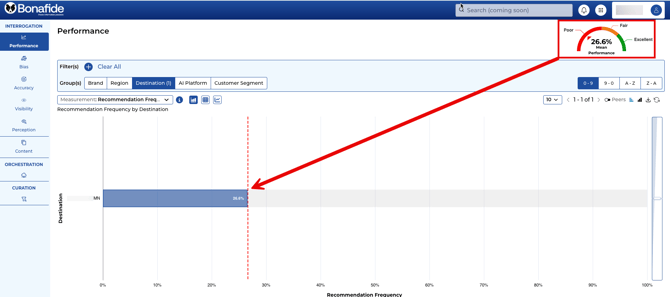
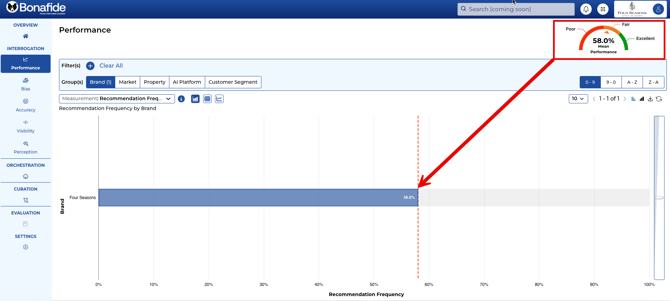
The initial view of the Performance module analyzes data at the destination or property level, focusing on the individual TRAVEL BRAND.
Action: Locate and select the Performance module in the main navigation (implied first step).
Locate the Group(s) Console: Find the Group(s) Console in the center of the screen, underneath the filter (+) symbol.
Confirm Destination/Property View: Ensure the Destination/Property tab within the Group(s) Console is depressed (selected) to show the individual Destination/Property’s overall score.
Destination DMO Example
Hotel Example
Step 2: Comparing Performance Against Peers
Performance measurements—including Bias and Perception—are based on comparison against competitors (Comp Set).
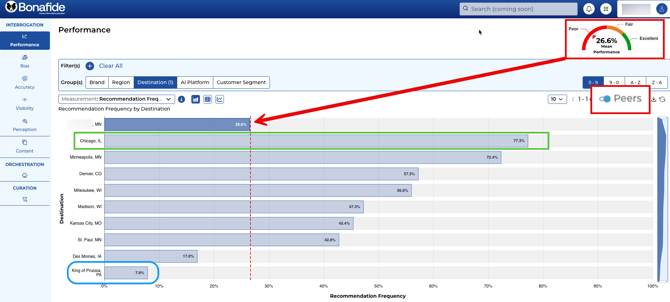
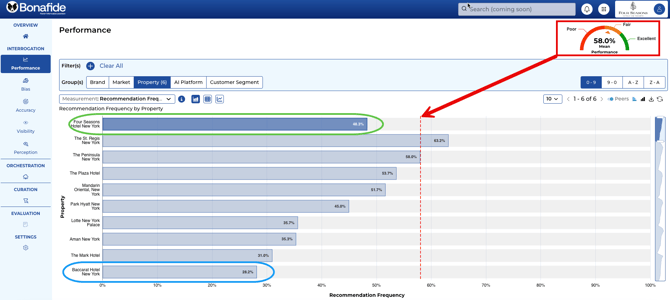
Action: Locate the Peer button, which is a toggle button located underneath the Sorting area. CLICK the Peer button to switch to the comparison view.
Analysis: This view shows how the Destination/Property stacks up against rivals.
Example, a destination like the Chicago DMO is considered indexing above average, while others might be "not doing well at all" (e.g., King of Prussia, PA).
Example, a hotel like the Four Seasons New York is considered indexing about average, while others might be doing much better (e.g., St. Regis New York) while the Baccarat Hotel New York is indexing much lower.
Step 3: Filtering Performance by AI Platform
Bonafide uses a rigorous approach, summarized in the "AI Platform" aspect, to collect its data.
Action: Navigate to the Group(s) Console and CLICK the AI Platform tab [User Query 1, 2].
Explanation (Interrogation Methodology): Bonafide ensures the assessment is robust by interrogating multiple AI platforms (not just one LLM). The system always uses the latest and most advanced versions of these AI models (e.g., new Gemini or updated GPT) because AI technology is constantly evolving.
The filtered view showing performance data across multiple, named AI platforms (LLMs), demonstrating Bonafide’s comprehensive data collection approach.
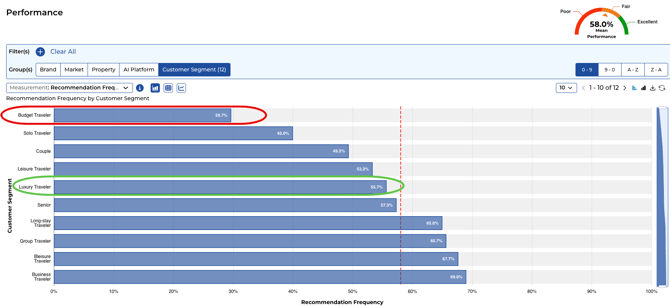
Step 4: Filtering Performance by Customer Segment
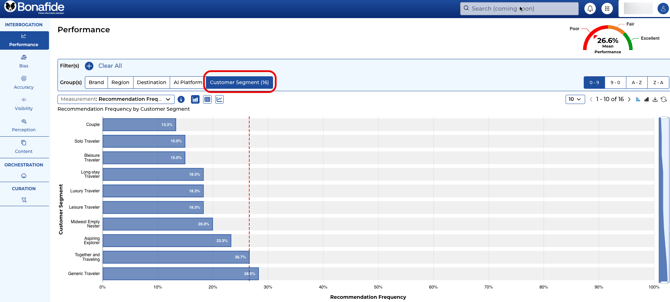
The DMO's performance is broken down into granular results based on different traveler types, known as Customer Segments.
Action: Navigate to the Group(s) Console and CLICK the Customer Segment tab (or Customer Types) .
Analysis:
Example for DMO: This view helps DMOs understand their strengths and weaknesses for various visitor segments (e.g., solo, luxury, leisure travelers). If a DMO scores low in a non-target segment, it "makes sense". If they score below average in a target segment (e.g., leisure travelers), it shows "exactly where they need to focus their data efforts".
view showing scores broken down by various Customer Segments (e.g., business travelers, family), highlighting the granular data available for strategic planning.
Example for Hotels: This view helps hotels understand their strengths and weaknesses for various visitor segments (e.g., solo, luxury, leisure travelers). If a Hotel scores below average in a non-target segment, for example, budget travelers for the Four Seasons Hotel (a luxury brand) it "makes sense". If they score below average in a target segment (e.g., luxury travelers), it shows "exactly where they need to focus their data efforts". On the other hand, over-indexing on certain segments not previously thought about by the hotels (such as Bleisure travelers) may reveal an opportunity for the hotel.
Conclusion: Performance in the AI Travel Landscape
The Performance Module reveals whether your BRAND is making the critical Top Five cutoff in AI recommendations. If your BRAND appears in the top five, it is visible; if it falls outside those few spots, you are effectively invisible to the traveler.
Integrated Analogy Summary:
The Performance Score is your AI Travel Agent Recommendation Score. If a traveler asks an LLM (the agent) for top places to visit, a low score (e.g., 25.0%) means the agent only suggests your BRAND one out of every four times a relevant traveler asks. Utilizing the Customer Segment filter is like asking the agent to refine their criteria (e.g., focusing on leisure or luxury), allowing the DMO to identify opportunities or critical gaps in their target markets. The core goal of using Bonafide is to increase this probability, ensuring travelers are presented with your BRAND in AI recommendations, which ultimately drives visitation.