
SECTION 1Introduction & The AI Revolution in Hospitality |
1. Introduction: The New Traveler Journey
The hospitality industry is undergoing one of the most significant transformations in its history. A new category of channel has emerged between the traveler and the brand website: AI-powered large language model (LLM) platforms. Travelers are no longer exclusively searching on Google, visiting OTAs, or reading review sites. They are asking AI chatbots — like ChatGPT, Google Gemini, Perplexity, Meta AI, and Claude — to tell them where to stay, which brand is best, and what amenities to expect.
Using This Guide: Hotels, Destinations & Airlines
This guide was written for any travel brand that wants to understand and improve how AI platforms represent them. The Bonafide platform applies equally to:
Hotel and resort brands — individual locations or multi-brand portfolios
Destination Marketing Organizations (DMOs) — Visit [City/State/Region] organizations promoting a place
Airlines — carriers with routes, schedules, policies, and onboard services
Other travel brands — car rental companies, cruise lines, tour operators, and more
Where this guide uses examples, those examples reflect hotel brands as they represent the largest segment of Bonafide clients. The underlying framework, modules, and insight methodology apply identically across all travel brand types. Industry-specific feature type categories for Airlines and Destinations are provided in Section 5.5.
This shift is accelerating rapidly. Based on industry research and Bonafide platform data:
|
Statistic |
What It Means |
|
70% |
of Americans now use Generative AI for travel research |
|
58% |
of travelers say AI improves their booking experience |
|
76% |
of travel industry executives say AI is fundamentally changing the industry |
Despite this shift, most brand websites were not designed to be read by AI. They were built for human eyes, search engine crawlers, and OTA integrations. The result: AI platforms are answering questions about your brands using third-party sources, outdated information, and in many cases fabricated responses.
Bonafide was built to solve this problem. The platform gives brand teams the tools to measure, understand, and optimize how AI represents their brands across all major LLM platforms.
1.1 The AI Platforms Bonafide Monitors
Bonafide tracks your brand's performance across five major AI platforms simultaneously:
|
AI Platform |
Description |
|
ChatGPT (OpenAI) |
The most widely used AI assistant globally; foundational for consumer travel research and trip planning |
|
Google Gemini |
Google's AI integrated into Search; captures high-intent travelers already in the Google ecosystem |
|
Perplexity AI |
Answer-engine focused on cited, sourced responses; particularly relevant for research-oriented travelers |
|
Meta AI (Llama) |
Facebook and Instagram AI; reaches broad consumer segments including leisure and social travelers |
|
Claude (Anthropic) |
Trusted for long-form, nuanced answers; growing use for detailed trip planning and complex travel queries |
1.2 The Scale of the Opportunity
Bonafide's system tracks hundreds of questions per brand -- the exact number varies by brand type (approximately a base prompt/question set of 520 to 1,000 for hotels and resorts, 300-400 for DMOs, and up to ~1,000 for airlines) — representing 83–87% of all questions currently being asked about brands by real travelers on AI platforms. These questions span every category a traveler would ask before, during, and after a booking decision.
|
KEY INSIGHT: The 22% to 30% Error Rate Bonafide's research, based on over 23 million AI prompts analyzed, found a 22.1% error rate in LLM responses about brands. Roughly 1 in 5 answers an AI gives about your brand is inaccurate. This represents both a risk (misinformation harming bookings) and an opportunity (fixing errors before competitors do). |
1.3 How Large Language Models Actually Work: The Prediction Engine
An LLM is fundamentally a very sophisticated fill-in-the-blank machine. It has read everything ever written on the internet. When you ask it a question, it does not "look up" the answer — it takes your words and predicts: what is the most statistically likely set of words to follow, based on every text it has ever read?
Example: Ask "What is the capital of Texas?" The AI finds that in 90% of written text, "Austin" follows that combination of words. It answers "Austin." It is not thinking — it is advanced pattern matching.
The critical implication for brands: if your correct, current information appears frequently in text that AI crawlers can read, the AI will reflect it accurately. If your content is locked in JavaScript menus, image galleries, or marketing copy — the AI defaults to outdated reviews, third-party descriptions, or simply wrong information.
|
WHY BRAND WEBSITES FALL SHORT Most brand websites are built for three audiences: human visitors, Google's search crawler, and OTA data feeds. None of these requirements produce content that AI language models can reliably parse. LLMs need explicit, structured Q&A-style content — not marketing copy, not image galleries, not dynamic JavaScript menus. |
1.4 The Two Brains of an LLM
|
Brain |
How It Works |
|
The Knowledge Brain (Training Data) |
Built from massive amounts of internet text. Historical data — does not update in real time. For brands, this often means AI works from old reviews, cached snapshots, or third-party descriptions. |
|
The Context Window (Real-Time Retrieval) |
When an AI fetches live sources at query time. If your website provides clear, accurate, machine-readable information, the LLM can find it in real time and override its training data. This is the window Bonafide helps you control. |
1.5 The Future: Agentic Commerce
The industry is rapidly moving toward agentic commerce — AI platforms that don't just answer questions but actually complete transactions on behalf of travelers. Bonafide defines a Commerce Readiness framework describing a brand's progression toward this future:
Commerce Readiness describes a brand's capability for AI-driven discovery and transactions — from being found in basic AI searches all the way to enabling AI agent-to-agent booking transactions. Bonafide's modules collectively measure the signals that determine where a brand sits on this capability spectrum. Rather than targeting a specific readiness level, treat each module's score as a vital sign revealing which content gaps are limiting your AI commerce capability.
SECTION 2Platform Overview — The Six Modules |
2. The Bonafide Platform: Six Measurement Modules
|
Module |
What It Measures |
|
1. Performance |
How often AI platforms recommend your brand when travelers ask relevant questions (Recommendation Frequency). |
|
2. Bias |
Your brand's GenAI Rank vs. Organic Search Rank — reveals whether AI is over- or under-representing you. |
|
3. LLM Accuracy |
How accurately AI platforms answer factual questions about your brand across 520 tracked questions. |
|
4a. Content Completeness |
The percentage of questions AI can answer with genuine confidence using your official website as the source. |
|
4b. Citation Percentage |
Of all AI responses that cite any source, the percentage that cite your official website. |
|
4c. Website Alignment |
How well your website content is reflected in AI responses — across four states: Aligned, Partially Aligned, Missing, and Unknown. |
|
5. Perception |
The sentiment and quality of how AI describes your brand — positive, neutral, or negative themes across attributes. |
In addition to the six measurement modules, the platform includes:
- Curation (Curator Module): The Q&A verification workspace where your team builds the official knowledge base that AI platforms reference.
- Orchestration: The deployment system for packaging and publishing your knowledge base so AI crawlers can find it.
- Settings: Configuration for Customer Segments (currently available), User Management, Auth Key, and Comp Set / Peers (under development).
2.1 The Vital Signs Framework: How to Think About the Five Modules
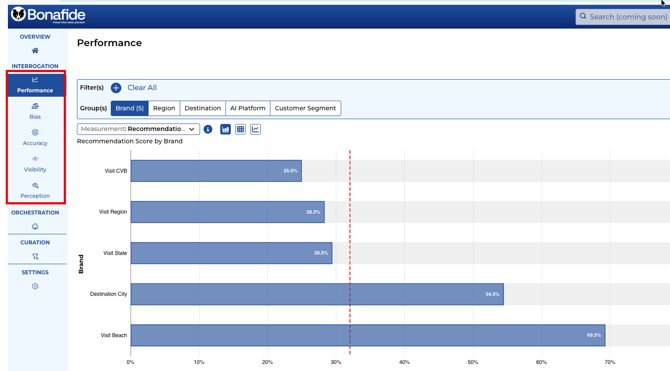
The five Bonafide measurement modules are Diagnostic Vital Signs — not causal drivers. Think of them exactly like a doctor's panel: blood pressure, heart rate, temperature, cholesterol. They tell you the patient's current health status. They do not, by themselves, fix anything. The medicine is what moves the numbers.
The five vital signs and what each monitors:
Performance — Recommendation Frequency: how often AI platforms surface the brand
Bias — GenAI Rank vs. Organic Rank: AI over/under-representation relative to search
LLM Accuracy — Factual correctness of AI responses across hundreds of tracked questions
Content Completeness / Citation % — AI's confidence level and source attribution
Perception — Sentiment and tone of AI-generated brand descriptions
The medicine that moves these vitals:
Orchestration = the medicine/pill. Deploys the verified knowledge base so AI crawlers can find and index it.
Curation = the exercise. The ongoing, hands-on work of verifying answers and building the knowledge base.
The Curator tool = the treadmill/exercise machine — the equipment that makes the exercise possible. We built curator to make exercise easier like a treadmill. Otherwise, you'll be walking or running outside or in the wild. It'll be harder
Never interpret a vital sign score as a lever to pull. Always frame scores as current readings, and point to Orchestration and/or Curation as the path to improving them.
A real-world example of vital signs fluctuating: Content Completeness scores have been declining industry-wide — not because brand content quality has declined, but because LLMs are increasingly hedging on confidence even when they know the answer. This is an LLM behavior change, not a brand performance issue. When you see a module score drop, always diagnose the cause before drawing conclusions about brand performance.
|
IMPORTANT: Score Improvement Takes Time Like traditional SEO, improving your Bonafide scores is a gradual process. When you add verified answers, LLMs take time to shift their sourcing behavior. Over multiple monthly cycles, accuracy scores rise, citation rates improve, and recommendation frequency increases. The most important thing is to start — every verified answer strengthens your AI presence. |
SECTION 3Performance Module — Recommendation Frequency |
3. Performance Module: Recommendation Frequency
The Performance module measures how often AI platforms recommend your brand when travelers ask relevant questions. This is called Recommendation Frequency — a percentage representing the share of applicable queries in which your brand appears in the top five AI results. Generative AI typically returns two to seven results; appearing in the top five is the primary benchmark.
3.1 What the Performance Score Means
Bonafide's Performance module measures two related but distinct concepts:
Performance Frequency measures how often your brand is recommended; Performance Score is the aggregated percentage metric over time.
Performance Frequency: To count as 'recommended,' your brand must appear in the top 50% of the AI-generated comp set ranking. The threshold scales with your comp set size:
10 brands in comp set -> your brand must rank in positions 1-5 (top 5)
6 brands in comp set -> your brand must rank in positions 1-3 (top 3)
2 brands in comp set (your brand + 1 peer) -> your brand must rank #1
Comp set size is therefore a direct variable in your score. Your comp set is configured during onboarding and can be updated via your Bonafide account manager.
Why 100% (or even 90%+) Is Mathematically Impossible:
Because Performance is a relative, ranked measurement against competitors, a score of 100% would require your brand to rank #1 on every AI platform across every query -- which doesn't happen in a real competitive set. Even top-performing brands should not expect scores above 85-90%.
Additionally, when competitors invest in optimizing their own AI presence, your Performance score can decrease even if your brand does nothing differently. This is normal behavior in a relative ranking system -- it mirrors how traditional SEO works.
Treat Performance as a vital sign: directional movement matters more than the absolute number. A stable score in the 50-70% range, trending upward month over month, signals a healthy AI recommendation presence.
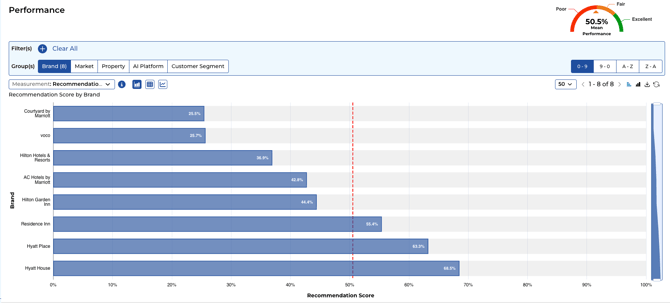
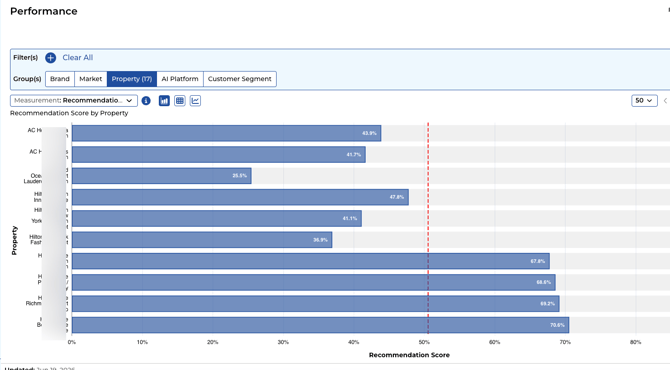
Think of your Performance score as a vital sign — a diagnostic reading that reflects where your brand stands relative to competitors at a given point in time.
|
TRAINING INSIGHT: A Typical Portfolio Client brand portfolios commonly show Performance scores ranging from approximately 40% to 67% across brands. Portfolio-level averages give leadership a quick read on overall AI visibility health, while brand-level breakdowns identify where to focus resources. |
3.2 Reading the Performance Dashboard
3.2.1 Aided vs. Unaided Measurement: A Critical Distinction
Performance is an aided measurement. This means Bonafide does not ask an AI 'Do you recommend [Brand]?' — because LLMs will always answer yes. Instead, the AI is given a restricted comp set (your competitive peers) and asked a natural traveler query such as: 'I'm traveling to [City] for business and considering these brands: [comp set list]. Which would you recommend?' The AI must choose from within that set.
This mirrors how travelers actually ask AI for hotel recommendations — with context about their trip and a comparison set in mind. The resulting score is how often your brand wins that comparison.
There is also an unaided awareness component (citation-based). Unaided awareness scales directly with market size: a brand in a major metro market (New York, London) will naturally appear in fewer AI-generated lists because there are many competitors; a brand in a smaller or niche market is more likely to be cited when any AI discusses that destination. Never compare unaided citation rates between brands in different market sizes without that context.
At the portfolio level, a horizontal bar chart shows each brand's Recommendation Frequency, color-coded by stage. At the brand level you see:
- Your brand's score vs. each individual AI platform (ChatGPT, Gemini, Perplexity, Meta, Claude)
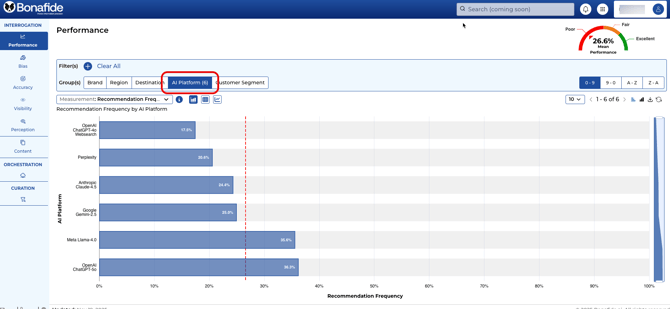
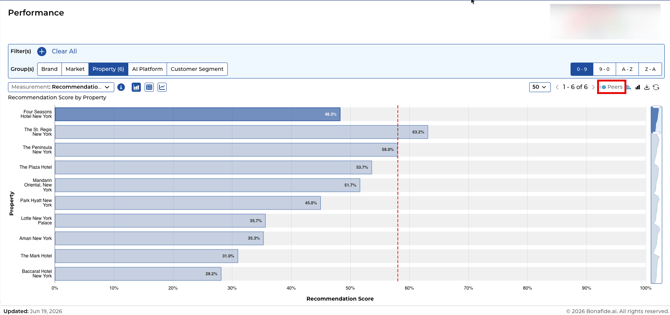
- Your brand's score vs. comp set peers
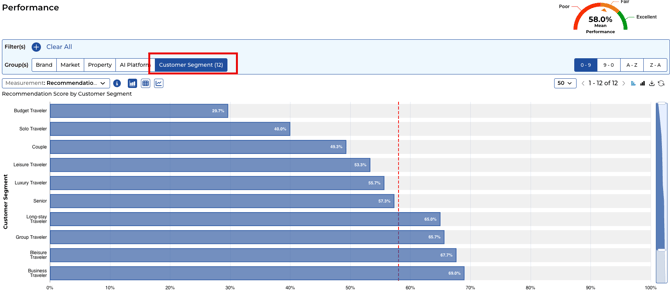
- Breakdown by Customer Segment — how often AI recommends you to different traveler types
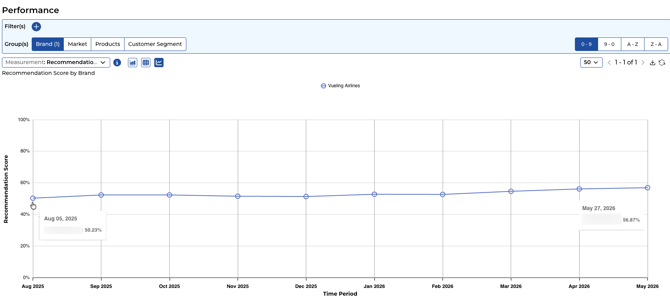
- Trend over time — are scores improving month over month?
3.3 Platform-Level Differences
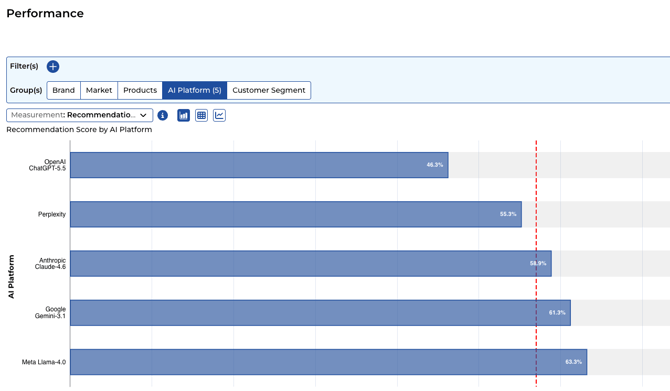 Performance varies significantly by AI platform. [Brand] may score 63% on Meta but only 46% on Chatgpt. This is normal — each platform has different training data, update frequencies, and recommendation logic. Platform-level differences guide where to prioritize content work.
3.4 Filtering by Customer Segment
Bonafide uses synthetic consumer profiles aligned to traveler types to query the AI platforms. Each profile represents a realistic traveler persona with context about their trip purpose, destination, and comparison set. The platform includes 12 default customer segments — such as Business Traveler, Family Traveler, Luxury Leisure, Budget Traveler, and more. If a query doesn't contain segment-specific context, it defaults to the Generic / Transient / Leisure category.
Available Filters: Filters available in the Performance module:
AI Platform — view performance on ChatGPT, Gemini, Perplexity, Meta Llama, and Claude separately
Customer Segment — compare performance across named traveler types (see list below)
Brand — isolate a single brand vs. its comp set
Market — filter by geographic market
The Mean Score auto-recalculates based on the current filter view — what you see is always the average for the specific slice of data you are looking at, not the overall portfolio mean.
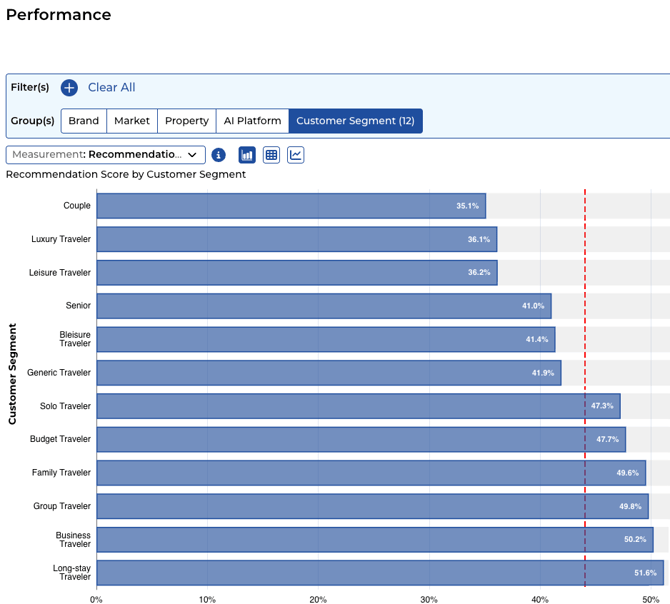
A brand might score 44% OVERALL but 51.6% with Long-stay Traveler but Couple travelers and only 35.1% with corporate business travelers — revealing a strong brand identity for one segment and a gap in positioning for another. Use Customer Segment filters to uncover and act on these nuances.
Named Customer Segments in Bonafide (10 default types):
Generic Traveler (catch-all) -- a rollup of all segments combined. This is the default 'all travelers' view and best baseline for overall performance. Any traveler who doesn't fit a specific segment is included here.
Budget Travelers -- price-sensitive travelers prioritizing value and low cost
Family Travelers -- groups traveling with children; prioritize kid-friendliness, space, and amenities
Seniors -- older adult travelers with specific accessibility and comfort priorities
Solo Travelers -- individual travelers who value safety, flexibility, and social atmosphere
Group Travel -- organized groups, corporate team trips, or multi-family bookings
Leisure Travelers -- vacation and relaxation-focused travelers
Long Stay Travelers -- extended-stay guests (7+ nights) who value kitchen access, laundry, and convenience
Bleisure Travelers -- blending business and leisure; value connectivity, location, and after-hours options
Couples -- romantic or partner travel; value ambiance, privacy, and experiential offerings
Performance can also be sliced by AI Platform -- viewing recommendation frequency on ChatGPT vs. Meta Llama vs. Claude (Anthropic) vs. Gemini vs. Perplexity separately -- to identify which platforms drive the most or least visibility for your brand.
3.5 Performance Insight Framework
Performance scores are directional vital signs — not universal goals. A resort in a low-competition market may reach its realistic ceiling at 60%, while an high-visibility flagship brand may reach 90%. Never cite a stage label as an absolute target. Instead, frame all insights around:
Month-over-month trajectory — is the score moving in the right direction?
Brand-to-brand comparisons — which brands lead vs. lag within the portfolio?
Platform-to-platform gaps — where is performance strong vs. weak across ChatGPT, Gemini, Perplexity, Meta, and Claude?
Meta Llama (Meta AI) consistently shows the lowest sourcing accuracy of all tracked platforms — a structural gap not solely addressable through content work. When flagging a Meta Llama lag in a client report, note this platform-level characteristic alongside any brand-specific explanation.
"Performance at 60.0% reflects current AI recommendation frequency — Orchestration and Curation are the levers to move this score over the coming monthly cycles."
|
TRAINING INSIGHT: Comp Set Comparison It is common to see [Brand] rank first overall in GenAI platforms, while Brand Y outperforms in the "luxury leisure" segment specifically. The Peers view in the Performance module surfaces exactly these gaps. Use it to identify where a competitor is winning travelers you should be capturing. |
SECTION 4Bias Module — GenAI Rank vs. Organic Rank |
4. Bias Module: AI Readiness Assessment
The Bias module answers a critical strategic question: If traditional search (Google) disappeared tomorrow and travelers could only use AI platforms — would your brand be okay?
Bias compares two rankings for each brand:
- GenAI Rank: Your brand's rank when AI platforms are asked to recommend brands in your competitive set
- Organic Rank: Your brand's rank in traditional search engine results (Google, Bing, etc.)
|
THE MOST COMMON BIAS PATTERN [Brand] holds the #1 organic search position in its market, yet AI platforms recommend it as the 5th or 6th option. This gap — strong search presence but weak AI presence — is the single most common and urgent issue Bonafide addresses. It reflects the disconnect between SEO (decades of investment) and AI optimization (brand new). Curation and Orchestration are designed to close this gap. |
4.1 The Bias Quadrant
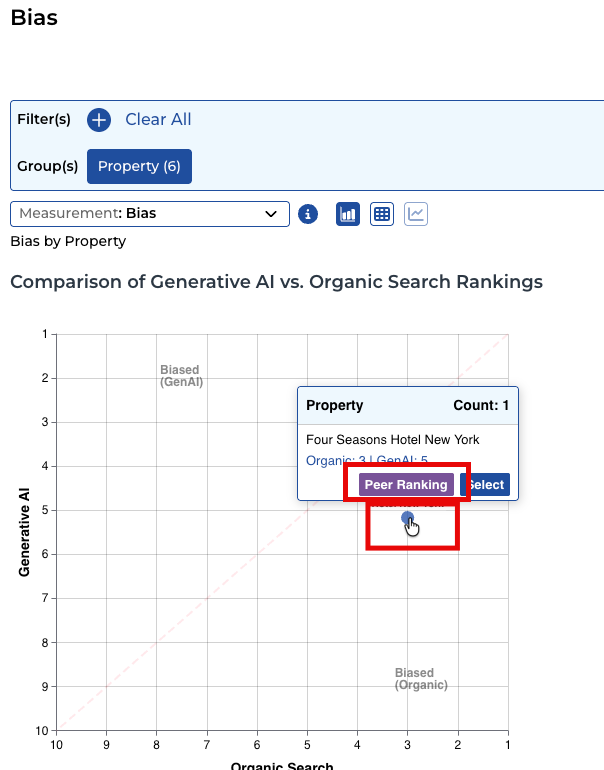
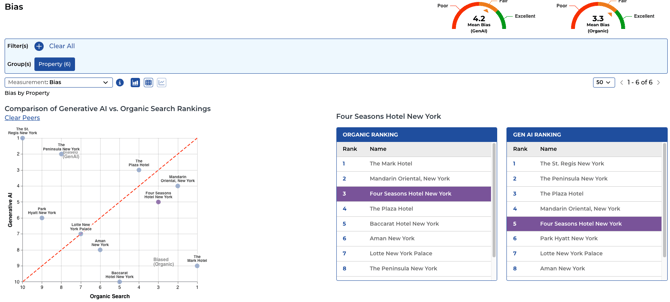
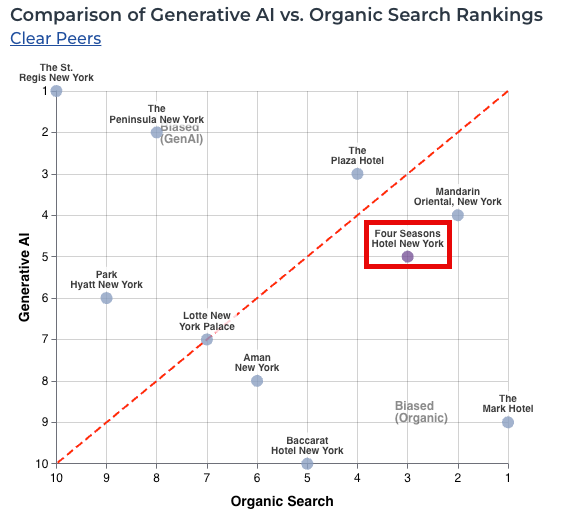
Organic Rank is sourced from SEMrush, the industry standard for search engine ranking data. The scatter graph plots each brand with GenAI Rank on one axis and Organic Rank on the other. A red dotted diagonal line divides the graph: brands above the line are healthy (GenAI rank is at least as good as organic rank); brands below the line need attention (organic rank outpaces GenAI rank — AI has not caught up with search authority).
|
Quadrant Position |
Strategic Meaning |
|
Top Right: Strong in Both |
Best position. Your brand leads in both traditional search and AI recommendations. Maintain through continued content quality. |
|
Top Left: High GenAI, Lower Search |
AI recommends you more than your search presence alone warrants. A positive situation — protect this advantage. |
|
Bottom Left: Weak in Both |
Neither search nor AI recommends you prominently. A broader visibility challenge requiring content strategy and aggressive curation. |
|
Bottom Right: High Search, Low GenAI |
The danger zone. You rank well in traditional search but AI is not recommending you. Growing revenue risk as travelers switch to AI-first research. |
4.2 Understanding Bias Score Dials vs. Graph Rankings
The Bias dashboard shows what appear to be different numbers between score dials and the graph/ranking tables. This is expected:
|
Dashboard Component |
What It Shows |
|
Score Dials (Mean Bias) |
Display the average ranking value across all five LLMs. Example: if the five platforms rank your brand 3.9, 4.4, 2.7, 3.4, and 4.6, the dial shows 3.8 (the average). |
|
Details Page |
Shows individual LLM rankings plus the calculated Global Average — the same 3.8 value shown on the dial. |
|
Scatter Graph and Tables |
Display relative positions after sorting all brands by their average rank. If your 3.8 average is the lowest in the competitive set, the graph shows #1. The graph shows positional rank, not average score. |
|
WHY THE NUMBERS LOOK DIFFERENT Score dials show 3.8 and the graph shows #1 — both are correct. The dial is the raw average across all LLMs. The graph position is where that average places you relative to your competitive set. Both values come from the same underlying data, displayed at different stages of the calculation. |
4.3 Reading the Bias Dashboard
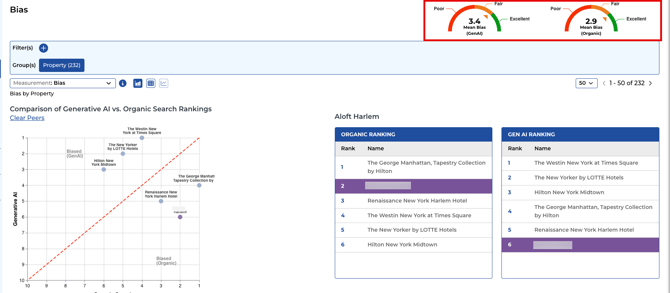
- Portfolio-level summary showing Mean Bias for both GenAI and Organic channels
- Brand-level drill-down showing exact GenAI Rank and Organic Rank, per AI platform
- Peers comparison showing where your brand sits relative to the competitive set
- Filtering by Customer Segment — bias can differ significantly for different traveler types
- Filtering by AI Platform — bias may be stronger or weaker on individual platforms
4.4 Bias Insight Framework
Key convention: lower rank number = better (Rank 1 = top of the competitive set). Always confirm this orientation when presenting Bias data to clients.
The most common pattern: stronger organic search rank than GenAI rank — reflecting decades of SEO investment vs. early-stage AI optimization. Curation and Orchestration close this gap over time.
How to read the gap direction:
Positive gap (GenAI rank worse than Organic rank) = AI is under-representing the brand. Most common situation — primary use case for Curation + Orchestration.
Negative gap (GenAI rank better than Organic rank) = AI favors the brand more than search. Protect this advantage — it represents AI optimization working ahead of the competition.
Insight focus: which brands have the widest gap (most urgent Curation need), which have closed or flipped their gap, and which traveler segments show the most bias.
|
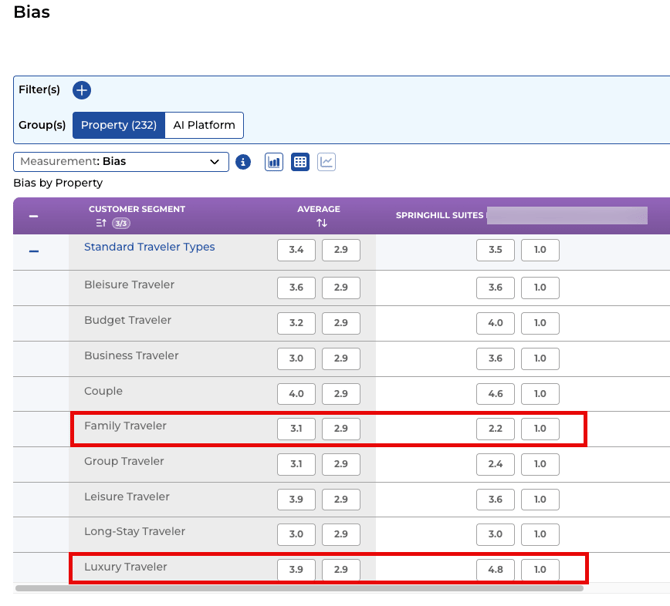
TRAINING INSIGHT: Segment-Level Bias One brand showed a positive overall bias score, but when filtered to group/meeting travelers, the bias dropped significantly — revealing AI was underrepresenting the brand for that critical segment. Always filter by your most important traveler types to uncover hidden gaps.
Example screenshot below shows a Limited Service hotel has a gap of -3.8 (1 organic search rank vs. 4.8 Gen AI Rank) on Luxury Travel segment but does better with their ideal customer segment of Family Travelers (1 organic rank vs. 2.2 Gen AI rank). In this example, this hotel may decide the gap in Luxury travelers are ok given it is not their target customer segment to begin with |
SECTION 5LLM Accuracy Module — Factual Correctness |
5. LLM Accuracy Module
The LLM Accuracy module measures how correctly AI platforms answer specific, factual questions about your brand. This is the most direct measure of the quality of information AI has about your brand.
5.1 How Accuracy Is Calculated
- Establishing the Source of Truth: The primary source of truth is your brand's official website, which Bonafide's Agent Crawler automatically ingests. During onboarding, brands should also provide additional sources to supplement the website -- including CMS and PMS system content, CRS data, OTA content downloads, marketing material PDFs, and any other internal documents containing accurate brand information. The combined set of these sources (public website + provided onboarding materials) forms your complete System of Record.
- Posing Targeted Questions: Hundreds of tracked questions (approximately 520 for hotels/resorts, 300-400 for DMOs, up to ~1,000 for airlines) — specific, detailed, long-tail questions travelers actually ask — are posed to all five AI platforms simultaneously.
- Comparing Answers: Each LLM's response is compared against the verified System of Record to determine whether it matches.
- Calculating the Score: The final score is the percentage of tested LLMs whose answers matched the verified source. If 4 out of 5 match, the score is 80%.
|
Element |
Example — [Brand] Accessibility Feature |
|
Feature |
Roll-in shower availability (Accessibility) |
|
System of Record |
Yes (found on [Brand]'s official website) |
|
ChatGPT (OpenAI) |
Answered "don't know" — No Match |
|
Google Gemini |
Answered "Yes" — Match |
|
Perplexity |
Answered "Yes" — Match |
|
Meta Llama |
Answered "Yes" — Match |
|
Claude (Anthropic) |
Answered "Yes" — Match |
|
Accuracy Score |
80% (4 out of 5 LLMs matched) |
5.2 Blank Scores: The Red Flag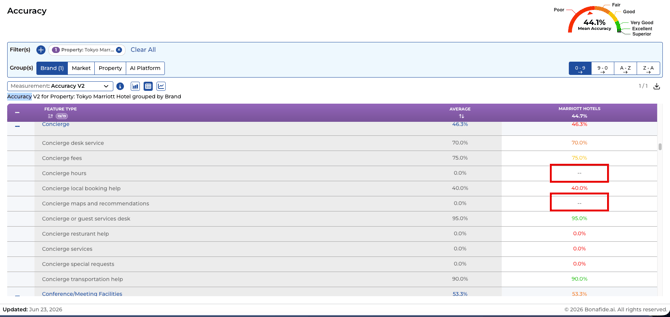
5.2.1 Understanding 'Don't Know' Responses
When an LLM hedges its answer — using phrases like 'I think,' 'you may want to check with the brand,' or 'I'm not certain' — Bonafide treats that response as a 'Don't Know' rather than a correct or incorrect answer. This is intentional: a hedged response in a real traveler interaction is functionally the same as no answer — the traveler doesn't get reliable information.
Hedging behavior varies by LLM: Claude (Anthropic) and Meta Llama are currently the most likely to hedge, which can lower their accuracy scores even when their underlying knowledge is correct. This is a behavior choice by those LLM providers, not a reflection of content quality.
5.2.2 Source of Truth Flexibility
The Source of Truth for any question does not have to be the brand's main website. Bonafide can ingest answers from a variety of sources:
Brand website (primary, automatic via Agent Crawler)
PDFs — brand fact sheets, F&B menus, spa menus, accessibility guides
Product catalogs or rate sheets
LLM consensus — when 3 or more of the 5 tracked LLMs agree on an answer, that consensus can serve as the provisional Source of Truth for questions where no official source exists
Important: if your brand's website contains an error, Bonafide will accurately report AI as correct when it repeats that error. The crawler takes what the website says as truth. If the website is wrong, fix the website first, then update the Curator answer.
5.2.3 Custom Questions and Prioritization
The base question set (approximately 520 to 1,000 for hotels and resorts, 300-400 for DMOs, up to ~1,000 for airlines) cover 83–87% of all traveler AI queries. Clients can add custom questions and prompts beyond this base set — for example, brand-specific policy questions, fridge case queries/prompts competitive differentiation points, or locally relevant content that the base set doesn't cover.
Within the accuracy module, questions can be prioritized. Some questions require 100% accuracy (e.g., ADA accessibility information, allergy policies, legal disclosures) while others can comfortably sit in the high-90s% range. Work with your Bonafide team to set appropriate priority tiers for your specific brand.
Parent-child dependent questions are also rolling out: if a brand has no pool, Bonafide will not ask pool temperature, pool pH, or pool accessibility sub-questions. This prevents blank scores from appearing for features that simply don't exist.
A blank score (--) occurs when: (1) the crawler could not find an answer on the brand's official website, AND (2) the LLMs could not reach majority consensus anywhere on the web.
|
BLANK SCORES ARE RED FLAGS A blank score means travelers are asking this question and the AI cannot find a credible, consistent answer. LLMs are forced to pull from unverified sources like Reddit or TripAdvisor, leading to conflicting answers, customer confusion, and hallucination. Every blank score represents a question your brand needs to answer definitively in the knowledge base. |
5.3 The Optimization Paradox: Why Your Accuracy Average Percentage Score May Drop First
When you begin curating — adding verified answers to your knowledge base — your mean accuracy score often drops before it rises. This is called the Optimization Paradox, or the U-Shape Phenomenon, and it is not a sign that something is wrong.
|
Phase |
What Happens |
|
Phase 1: The "Easy A" |
Initial scores look good because AI is only tested on what it already knows — basic facts like address, pool existence, and check-in time. This is shallow data and a misleading baseline. |
|
Phase 2: The Dip (Curation) |
When your team curates hundreds of detailed questions — "Is the pool heated to a specific temperature?" — you introduce hard questions the AI hasn't been taught. Scores drop, sometimes significantly. This is healthy: you are exposing the Invisible Gap. |
|
Phase 3: The Recovery (Orchestration) |
After curation, verified answers are deployed via Orchestration. AI crawlers learn the specific details they were missing. Your score rises, often above the original baseline — because the AI is now correctly answering hard questions. |
|
KEY INSIGHT: Embrace the Dip A high score built on shallow data is worth far less than a lower score that reveals what the AI truly does not know. The brands that successfully navigate the Optimization Paradox achieve genuine AI authority — because they taught the AI the deep knowledge only they possess. Expect the dip. Trust the process. Track the recovery. |
5.4 Understanding Your Accuracy Score
Think of your Accuracy score as a vital sign — a diagnostic reading of how much of your brand's knowledge has been verified and is actively deployed to AI. Rather than targeting a specific percentage, prioritize eliminating blank scores (the highest-value gaps) and track MoM trajectory. Scores may temporarily dip as the Optimization Paradox exposes new questions — this is a healthy sign of curation progress, not regression.
5.5 Accuracy by Feature Type
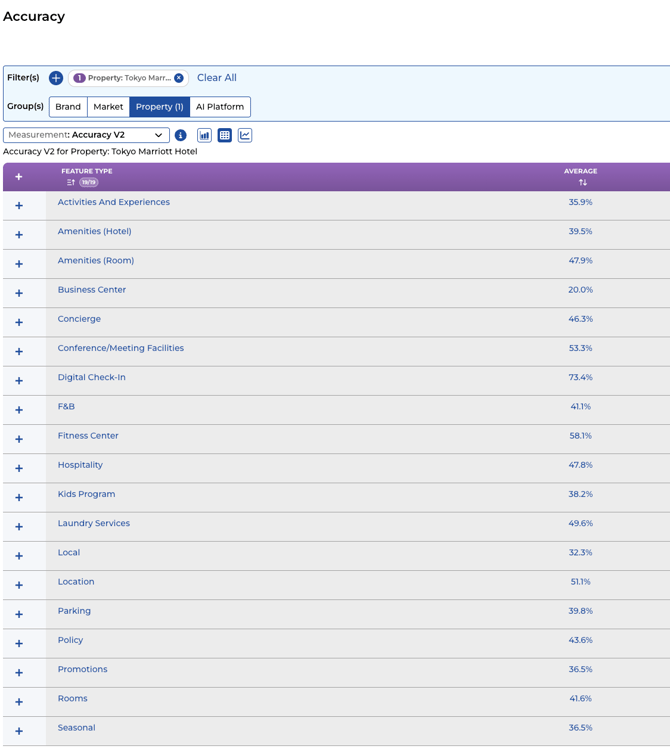
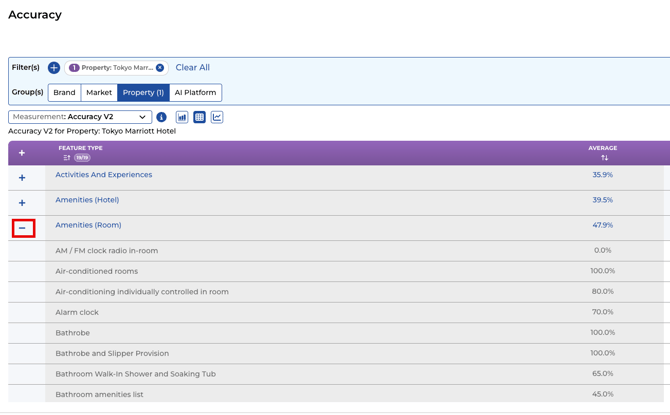
Feature type categories tracked per brand type:
Hotels & Resorts
Amenities: Pool, spa, fitness center, dining outlets, accessibility features
Policies: Check-in/out times, pet policies, cancellation terms, parking fees
Room Features: Room types, bedding configurations, views, technology
Location & Transportation: Distance from airport, parking, shuttle service
Services: Concierge, business center, event and meeting spaces
Airlines
Aircraft & Route Info: Fleet types, route networks, codeshare partners
Airport & Lounge: Terminal details, lounge access, priority lanes
Baggage & Cargo: Allowances, fees, restrictions, oversized and special item policies
Booking & Ticketing: Fare classes, change/cancel fees, booking channels
Check-In & Boarding: Online check-in windows, boarding groups, seat selection
Onboard Services: Meals, entertainment, Wi-Fi, seat configurations, amenity kits
Loyalty & Partnerships: Frequent flyer programs, partner earn/burn, alliance benefits
Passenger Experience: Accessibility services, special assistance, family policies
Travel Requirements: Visas, documentation, health requirements by route
Additional categories: Ancillary Services, Ground Services, On-time Performance, Operational History, Scheduling
Destination Marketing Organizations (DMOs)
Attractions, Experiences & Highlights: Key sights, activities, events, cultural experiences
Arrival & Departure: Airports, border crossings, visa requirements, entry/exit logistics
Budget & Affordability: Average costs, tipping norms, value perception vs. alternatives
Character & Vibe: Destination personality, atmosphere, traveler fit and appeal
Climate & Weather: Seasonal conditions, best time to visit, packing guidance
Food, Dining & Cuisine: Local specialties, dining culture, dietary options
Accommodations: Lodging options, neighborhoods, booking guidance
Transportation: Getting around, local transit, ride share, car rental
Health & Safety: Medical facilities, safety conditions, current travel advisories
Hospitality & Customs: Local etiquette, cultural norms, tipping practices
Travel Planning & Itineraries: Trip length suggestions, sequencing, traveler type recommendations
Additional categories: General Information, Popularity & Crowds, Sustainability & Environment
5.6 LLM Accuracy Insight Framework
Commerce Readiness Levels are directional stage labels — reference them as descriptors of current capability, not as universal goals to hit. Every client's realistic score ceiling depends on brand complexity, question coverage, and competitive environment.
Key insight rules for LLM Accuracy:
Blank scores (--) = highest-priority Curation gaps. Every blank is a traveler question going unanswered, creating hallucination risk. Flag these prominently in client reports.
The Optimization Paradox: a MoM accuracy dip during active Curation is healthy — hard questions are newly exposed that AI hasn't yet learned. Always contextualize a dip during an active curation period. Scores recover and surpass the original baseline once Orchestration deploys the curated answers.
Meta Llama consistently shows the lowest accuracy and highest guessing rates of all tracked platforms.
"Accuracy improved +5.3 pts MoM — a direct result of curation work now being indexed by AI crawlers."
|
TRAINING INSIGHT: Meta AI Performance Meta AI (Llama) consistently shows the lowest accuracy and highest guessing rates. In one brand example, Meta was guessing approximately 98.5% of the time — almost never citing the official website. ChatGPT and Perplexity typically show stronger sourcing behavior. This guides where to prioritize content and curation work. |
SECTION 6Visibility Module — Content Completeness, Citation & Website Alignment |
6. Visibility Module
The Visibility module contains three interconnected measurements: Content Completeness, Citation Percentage, and Website Alignment. Together they reveal how well your official website serves as the authoritative source for AI platforms.
6.1 Content Completeness
⚠ Important Platform Context (as of 2025–2026): Content Completeness scores are currently declining industry-wide — not because brand content quality has declined, but because LLMs are increasingly hedging on confidence even when they can answer a question correctly. They say 'I'm not fully certain' even when their answer is right.
This is a vital sign fluctuation caused by LLM behavior change, not brand performance. Bonafide is actively adjusting the confidence interval measurement to account for this. In the meantime: pay more attention to LLM Accuracy than Content Completeness when assessing how well AI knows your brand.
When writing insights about Content Completeness, always note this context. Do not characterize a declining Completeness score as a brand content failure unless Accuracy is also declining.
Content Completeness is a confidence score. It measures whether an LLM can answer questions about your brand with genuine certainty — not just guess. It asks: "Is the AI sure — and can it prove it?"
Platform split is critical context: Google Gemini typically shows the highest completeness; OpenAI ChatGPT and Anthropic Claude often show near-zero until structured JSON-LD data is indexed via Orchestration. A near-zero score on Claude or ChatGPT is an Orchestration signal, not a content gap.
Low completeness means AI is guessing — even a technically correct guess today could be wrong tomorrow. Frame scores around directional progress of the knowledge base, not a fixed percentage destination.
|
Scenario |
Impact on Content Completeness Score |
|
AI answers correctly AND declares confidence |
Positively contributes to the score. The AI genuinely knows this fact and can back it up with sources. |
|
AI is NOT confident — even if technically correct |
Negatively impacts the score. Uncertainty itself is the problem — a guessing AI that happens to be right today could be wrong tomorrow. |
|
AI has no answer and acknowledges it |
Negatively impacts the score. A knowledge gap that curation and orchestration must fill. |
|
THE UNIVERSAL STARTING POINT: ~20% Across all brand brands onboarded to the platform, Content Completeness starts around 20%. For approximately 80% of the 520 questions, AI platforms cannot confidently answer using your official website. This is not a reflection of your brand's quality — it is how brand websites are built. The entire Curation and Orchestration workflow exists to move that 20% toward 80% and beyond. |
6.2 Citation Percentage
Platform-specific citation behavior varies significantly and requires careful interpretation:
Google: Cites brand websites most aggressively — Google has strong commercial motivation to keep the web ecosystem healthy and well-crawled. High Google citation rates are common for well-optimized brands.
Meta Llama: More likely to cite social media content (Instagram, Facebook) or brand social media page profiles than official brand websites. A lower Meta Llama website citation rate does not always indicate an orchestration failure — social content may simply be better-represented.
Anthropic (Claude): Operates fundamentally differently — uses inference search and stores less in its retrieval corpus. Claude does not cite brand websites in the same direct way other platforms do. A low Claude citation score is NOT necessarily a problem. Do not flag low Claude citation as an orchestration issue without further investigation.
OpenAI / Perplexity: Motivated by rapid information retrieval — frequently cite brand websites when content is well-structured and crawlable.
Looking ahead (coming soon): Not all citations are equal. Being cited first (the first source listed) carries more weight than being cited fifth. Bonafide is developing citation order tracking as a future metric — the goal is not just to be cited, but to be cited prominently.
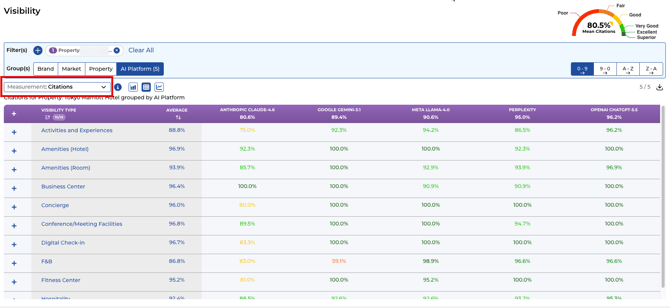
Citation Percentage measures how often AI responses cite your official brand website — out of all responses that cite any source at all.
Formula: Citation % = LLM responses that cited your official website ÷ LLM responses that cited anything at all
- A score of 0.80 (80%) means 80% of the time an LLM cited something in that category, it cited your official website/website domain.
- Only responses where the LLM actually provided a citation count. Uncited responses are excluded from the calculation.
- Calculated at the feature and product level — so you can see exactly where your website is being credited and where it is not.
Citation Percentage is a leading indicator of brand authority in the LLM channel. When LLMs cite your website, they signal — to users and to their own training — that your content is the trusted source of record.
Properties with very low citation rates likely have an Orchestration issue (sitemap, robots.txt, JSON-LD deployment) rather than a content gap. Before recommending additional content creation for a low-citation brand, verify that Orchestration has been deployed and the knowledge base is discoverable.
"A citation rate of 6.7% for [Brand] signals AI is not sourcing from the official website — Curation and Orchestration are required to establish the brand as the authoritative source."
6.3 Website Alignment (In Development - Coming Soon)
Website Alignment is a real-time health check measuring how well your website content is reflected in what LLMs are telling travelers. It asks: does your website even have the content, and are LLMs picking it up correctly?
|
Alignment State |
What It Means |
|
Aligned |
Your website has a clear answer and the LLMs say essentially the same thing. The healthy state. Example: [Brand] shows 69% Aligned content. |
|
Partially Aligned |
Your website has the information but the LLM's response doesn't fully match it. Incomplete, imprecise, or inconsistent across platforms. An opportunity: the raw material exists but is not being picked up cleanly. |
|
Missing Website Content |
No answer on your website at all. LLMs may still attempt to answer — with no grounding in anything you've published. A true content gap requiring immediate curation. |
|
Unknown |
Missing from both your website and the LLMs. Edge cases or niche questions where neither side has addressed the topic yet. |
|
WEBSITE ALIGNMENT VS. ACCURACY Website Alignment is based exclusively on what's found on your public website. Accuracy compares AI responses against your verified answers (which may include answers you've curated but not yet published). Alignment = current state of your website as an AI source. Accuracy = whether AI is getting right answers by any means available. |
SECTION 7Perception Module — How AI Describes Your Brand |
7. Perception Module
Perception captures the opinions, sentiment, and "vibe" that AI platforms have developed about your brand. Unlike Accuracy (verifiable facts), Perception assesses the subjective reputation of your brand — how AI characterizes its personality, quality, and experience.
7.1 How AI Forms Perceptions
Think of Perception as the 'Net Promoter Score equivalent' for AI sentiment — but unlike NPS, Perception is always relative to the comp set, never absolute. The platform forces a stack rank: every brand in the comp set is ordered from most to least favorably perceived on each dimension. Even if all brands in a comp set deliver exceptional service, one of them will still rank last for service perception relative to the others.
This means: never interpret a Perception score in isolation. A brand with a 'low' perception score may be performing excellently in absolute terms — it is just ranked lower than strong peers. The competitive set context is everything.
Perception is not connected to Marriott, Hilton, or any brand's internal guest satisfaction scores. It is a separate measurement of what AI has learned from web content — which may diverge significantly from survey-based satisfaction data.
Data lag is a critical factor:
AI pulls perception signals from TripAdvisor reviews, Google Reviews, Booking.com reviews, travel blog posts, and Reddit (increasingly a major source)
Recently renovated brands may show artificially low perception scores for 24–36 months after renovation — AI has read years of pre-renovation reviews and is slow to update
A brand that completed a $50M renovation in 2023 may still show low 'Amenity' perception scores in 2025 because the review corpus still contains more old reviews than new ones
When presenting Perception data for recently renovated brands, always include the renovation timeline as context. Low scores during the 24–36 month post-renovation window are expected and are not a content or curation failure.
Coming soon: Citation source tracking for Perception — which specific review platforms and sources are most influencing AI's perception of your brand.
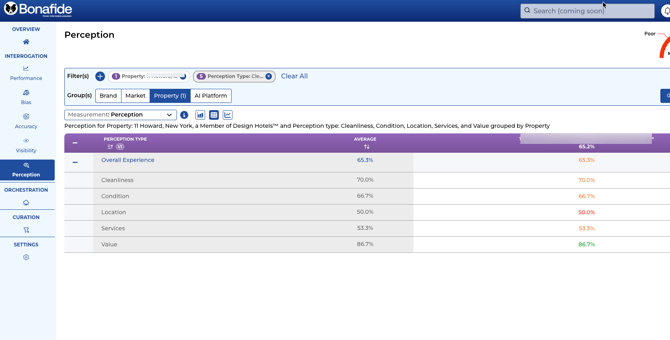
LLMs form perceptions by scraping vast quantities of web text — traveler reviews, travel blogs, social media, and editorial coverage. A primary challenge is the AI's indiscriminate data consumption. Isolated negative comments on TripAdvisor or Reddit can give the AI a skewed narrative that does not reflect your brand's actual quality. A single viral negative review can meaningfully influence how AI describes your brand for months.
Perception scores are relative — measured in comparison against your brand's peers in the competitive set.
Perception is slower to move than Accuracy. A factual correction fixes in days. Shifting a negative perception takes multiple monthly cycles — AI's training data is weighted heavily by volume, and a single viral negative review can skew the AI narrative for months. Rich, detailed, positive official content deployed through Curation and Orchestration gradually overrides third-party narratives over time.
Insight focus: highest and lowest perception dimensions within the portfolio, brand spread, and which traveler perception types (Value, Services, Location, etc.) are reading lowest and why.
7.2 What Perception Measures
- Service quality: How AI describes the professionalism, responsiveness, and warmth of your team
- Amenity satisfaction: Whether AI characterizes your pool, restaurant, spa, and other offerings positively or negatively
- Location and surroundings: How AI describes your neighborhood, accessibility, and proximity to attractions
- Value perception: Whether AI suggests your brand represents good value or an expensive option
- Overall vibe and atmosphere: The "personality" AI assigns to your brand — romantic, business-focused, family-friendly, boutique, etc.
7.3 Controlling the Narrative
When a perception issue is identified, you can directly address it through the Curator module. By proactively verifying and deploying robust, positive content, you push your approved narrative to LLMs — gradually overriding isolated negative content from external platforms. This involves:
- Ensuring factual content: Correct, comprehensive facts that positively represent your brand
- Optimizing content depth: Rich, detailed answers to subjective questions about quality and experience
- Consistent curation: The more verified content in your knowledge base, the more weight LLMs give your official narrative over third-party reviews
|
PERCEPTION VS. ACCURACY Perception is harder to control than Accuracy. A factual inaccuracy (wrong check-in time) can be corrected quickly through curation. Shifting a negative perception (AI consistently describes your restaurant as "average") takes sustained effort over multiple monthly cycles. The key is rich, detailed content about quality and experience — not just operational facts. |
SECTION 8Curator Module — Building Your AI Knowledge Base
|
8. Curator Module: Building Your AI Knowledge Base
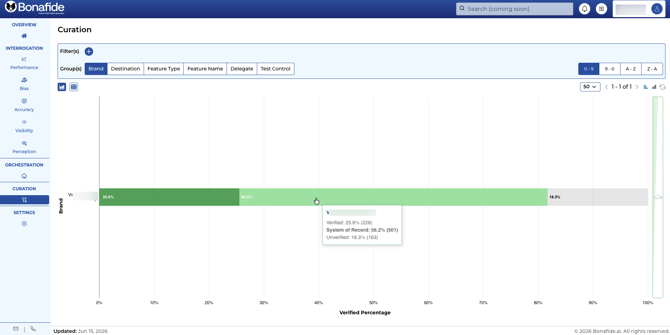
The Curator module is the heart of the Bonafide platform. It is where your brand team does the hands-on work of building and verifying the official knowledge base that AI platforms reference. Every score across the platform is influenced by the quality and completeness of your Curation work.
|
HOW CURATOR AFFECTS ALL OTHER METRICS Curator is the linchpin connecting your brand's data to every downstream metric:
|
8.1 Full Curator Training Guide Details Here
Click Here for Full Curator Training Guide
The Curator module visualizes verification status with a color-coded bar chart at the portfolio level:
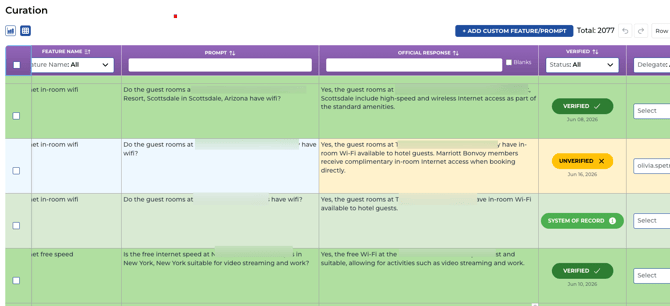
Light green = System of Record — the answer was found on the brand's official website by Bonafide's Agent Crawler. No human action required; these auto-populate.
Gray = Unverified — the crawler could not find a definitive answer on the official website. These are your curation targets. Two types exist: (1) blank (no answer anywhere) and (2) pre-populated with LLM consensus (3+ LLMs agree on an answer, shown as a starting point).
Dark green = Verified — a human curator has reviewed and confirmed the answer. Only System of Record AND Verified answers are deployed into the active knowledge base. Unverified answers do NOT get distributed to AI platforms, regardless of LLM consensus.
|
Status |
What It Means |
|
System of Record (Light Green) |
The answer exists on your official brand website. Bonafide's crawler found and confirmed it. Automatically included in your FAQ package for orchestration. |
|
Unverified (Yellow) |
Not yet officially verified by your team. May be blank (no answer found anywhere) or may contain an AI-suggested answer pending human review. Excluded from your FAQ package. |
|
Verified (Dark Green) |
Your team has reviewed, approved, and verified this answer. Your brand's declared source of truth. Included in the FAQ package and deployed to AI crawlers. This is the status to aim for. |
8.2 LLM Consensus: The AI Assist Feature
The LLM Consensus feature pre-populates the Official Response field with the answer that 3 or more of the 5 tracked LLMs agree on. This is the single biggest efficiency accelerator in the Curation workflow — instead of researching every question from scratch, curators review and confirm pre-filled answers.
Consensus accuracy in practice is very high — the 80% threshold noted in Bonafide's scoring methodology is conservative. When Gemini, ChatGPT, and Perplexity (the three most accurate platforms) all agree on an answer, real-world accuracy is in the high 90s%. The consensus support percentage is displayed alongside each pre-filled answer.
Bulk verification option: For brands that want to accelerate curation significantly, the Bonafide team can perform bulk verification of LLM consensus answers — reviewing and approving all high-confidence consensus items at once rather than one by one. Contact your Bonafide account manager to initiate a bulk verification session.
📸 [SCREENSHOT] Curator module showing an Unverified question with the Official Response field pre-populated by LLM consensus. The Consensus Support percentage (e.g., 80%) is visible. The Verify button is highlighted, showing the one-click confirmation workflow. URL/citation link field also visible.
Instead of relying on a single AI's guess, Bonafide simultaneously asks each Unverified question to all five major LLMs. If a majority (3 out of 5 or more) independently return the same answer from the open web, that agreement is an "LLM consensus."
|
Concept |
Detail |
|
Consensus Confidence Rate |
When 3+ of 5 LLMs agree on an answer, that consensus is accurate 80–90% of the time per Bonafide's internal research. |
|
How It Appears |
When consensus exists, the Official Response cell is pre-populated with the consensus text as a recommended starting point. Your team reviews, edits if needed, and clicks Verified. |
|
Scenario A: Pre-Populated Cell |
An AI-recommended answer exists. Read it carefully, edit any inaccuracies or add brand context, then click Verified. |
|
Scenario B: Blank Cell |
No consensus was reached anywhere on the web. This is a critical content gap. Draft the answer from scratch using internal knowledge or department experts. |
|
AI ASSIST TIP: Select Template View Click the "Select Template" dropdown inside the Official Response cell to see exactly how each LLM answered the prompt side-by-side. Cherry-pick the best formatting or combine the most accurate elements from multiple AI responses into a single verified answer. |
8.3 Closing the Gap: Step-by-Step Curation Workflow
When curating answers, you can add a URL link to each answer — a direct link to the page, PDF, or document that proves the answer. This serves two purposes: (1) it gives the AI crawler a direct citation path to your authoritative source, and (2) it creates an audit trail for your team so future curators know where each answer came from.
Step 1: Finding Your Content Gaps
- Open the Curator module and click the Detail view icon (grid/spreadsheet icon) in the upper left corner.
- Scroll to the right side of the spreadsheet to find the Verified column.
- Click the dropdown in the Verified column header. Check "Unverified" and click OK.
- Filter by Priority: Highest to start with the most impactful questions.
Step 2: Filling the Gaps
|
Scenario A — AI-Recommended Answer (Pre-Populated Cell) An AI consensus answer already appears. Action: (1) Read carefully. (2) Double-click to edit if anything is incorrect — add brand-specific context, correct errors. (3) Click "Verified" to take official ownership. The row turns dark green. |
|
Scenario B — Blank Answer (No Consensus) The cell is completely empty — no AI consensus was reached on the web. Action: (1) Double-click the blank cell. (2) Draft your official, comprehensive answer — over-answer with rich detail rather than a simple yes/no. (3) Click "Verified" to save. |
|
CURATION BEST PRACTICE: Over-Answer Everything Instead of "Yes, we have a pool," write: "[Brand] features a heated outdoor pool open daily 7am–10pm, with a dedicated children's pool section, poolside bar service, and complimentary towels. The main pool is maintained at approximately 82°F year-round." This level of detail gives LLMs the contextual data needed to answer confidently across a variety of related questions. |
8.4 Prioritization: Where to Start
|
Priority Level |
What to Do |
|
Priority: Highest |
Start here. These are the most frequently asked questions. Answering them delivers the biggest impact on scores. |
|
Priority: High |
Address after Highest. Still significantly impactful on overall performance. |
|
Priority: Medium |
Important for comprehensive coverage once top priorities are addressed. |
|
Priority: Low / Lowest |
Long-tail questions. Valuable for completeness but lower immediate score impact. |
8.5 Delegation: Involving Your Department Experts
Delegation chains are fully supported: a delegate can further delegate specific questions to their own team members. Think of it as a 'village format' — the GM assigns F&B questions to the F&B Manager, who reassigns specific wine list questions to the Sommelier. Each person in the chain receives only their relevant questions.
You can also add custom prompts and questions to the delegation assignment — so a delegated question can include context or instructions for the person filling it in.
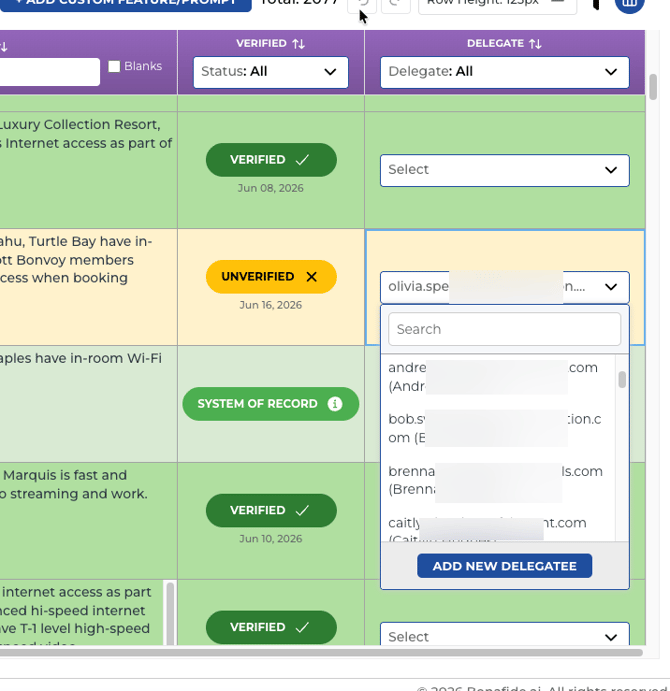
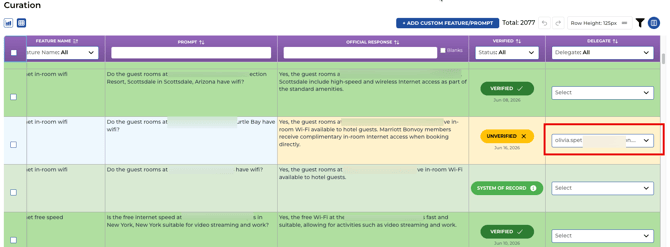 Many curation questions require specialized knowledge held by specific departments. The Delegation feature allows you to assign questions to subject matter experts without requiring them to have full platform access.
|
Aspect |
Detail |
|
Who Should Be a Delegate |
Department heads or specialists: F&B Manager (dining questions), Spa Director (spa questions), Director of Engineering (accessibility/technical), Front Desk Manager (policy questions). |
|
What Delegates Receive |
A targeted list of only their assigned questions via email. No full platform login required. |
|
How to Set Up |
Settings > User Management > Add User > assign the Delegate role. Then assign questions within the Curator module. |
|
Tracking Progress |
Monitor delegate completion through the reporting graphs in the Curator module. |
SECTION 9Orchestration Module — Deploying Your Knowledge Base |
SECTION 9Orchestration Module — Deploying Your Knowledge Base |
9. Orchestration Module
Orchestration transforms your verified Curation work into a deployed, machine-readable knowledge base that AI crawlers can find and index. Only questions with a Verified or System of Record status are included — which is why active curation directly determines the size and quality of your deployed knowledge base.
9.1 What Orchestration Creates
Orchestration's goal is to 'seed all the data in the right places' — getting your verified knowledge base in front of every AI platform's crawler simultaneously.
Distribution points include:
1. Your brand's official website [PRIMARY] — via subdomain hosting (context.yourbrand.com) or sub-directory placement (/faq)
2. context.bonafide.ai — Bonafide's own hosted knowledge hub, which is actively crawled by all major AI platforms
3. Common Crawl partnership — Bonafide provides verified, human-curated data sets to Common Crawl, a 20-year web crawl organization whose archived data is used by virtually every major LLM builder as foundational training data. This extends your verified content into the long-term AI training pipeline, not just real-time retrieval.
4. Real-time search indexing — direct submissions to search index APIs where available
One piece of verified content, published once through Orchestration, goes to multiple distribution points simultaneously.
Bonafide performs light SEO on the published knowledge base — structured to maximize AI crawler pickup without disrupting the human browsing experience of your main website. The FAQ content is designed to be crawled, not marketed to humans.
Update propagation timeline:
After you verify and save an answer in Curator, the update is deployed and pushed to all distribution points in approximately 20–30 minutes — near real-time.
How quickly AI platforms index the update depends on each platform's own crawler schedule. Google crawls most brand websites approximately every 3 days. Other AI crawlers may take up to 2 weeks between visits. Once crawled, the updated answer appears in AI responses from that platform going forward.
This means curation work has a compounding, long-term effect — every answer verified today continues working for months and years through LLM training pipelines, not just current-knowledge retrieval.
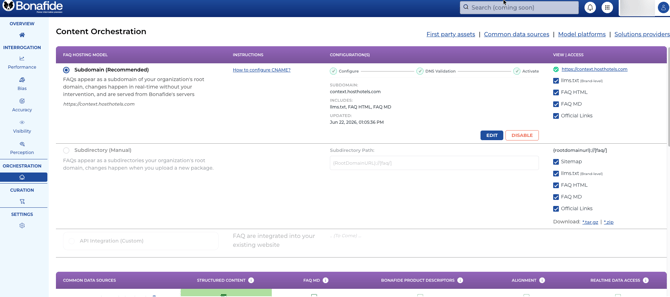
Bonafide translates your verified Q&A content into three machine-readable formats:
- HTML: Human-readable web pages for the FAQ section — visible to any site visitor or crawler
- Markdown (.MD): A simplified format LLMs ingest much faster than traditional web pages — the native language of AI knowledge bases
- Structured Data (JSON-LD): Hidden tags explicitly telling AI what is a "Question" and what is an "Answer," ensuring your data is used as a primary training source
9.2 Two Deployment Methods:
1. Automated Subdomain Hosting [PRIMARY and RECOMMENDED]
9.2.1 Automated Subdomain Hosting: Full Setup & IT Security Guide
|
Factor |
Detail |
|
Best for |
Brands wanting minimal IT involvement and fully automated updates |
|
How it works |
Bonafide provisions a subdomain (e.g., context.yourbrand.com) and publishes your FAQ package there. Updates from Curator flow through automatically. |
|
Technical requirement |
A DNS record update to point the subdomain to Bonafide's hosting infrastructure — typically a simple IT ticket. |
|
Advantage |
Zero ongoing maintenance from your team. Bonafide manages all file updates, sitemap generation, and crawler signaling automatically. |
See Step by Step Instructions on How to Setup Your Subdomain
What Automated Subdomain Hosting Does
Instead of manually downloading and uploading FAQ files, Bonafide hosts your FAQ content on a subdomain you control — such as faq.yourbrand.com. The content stays live and automatically updates whenever your team makes changes in the Curator module. Your Brand owns the subdomain; Bonafide hosts the content behind it on its own AWS infrastructure. The two never overlap.
|
THE CORE PRINCIPLE Bonafide does not need — and does not request — any access to your Brand's systems, servers, or DNS management console. Your IT team makes two DNS record additions independently. That is the complete extent of the integration. |
9.2.2 Exactly What IT Needs to Do
There are two DNS record additions required from your IT team. A DNS record is simply an entry in your domain's settings that tells the internet where to find something — the same kind of change IT makes when pointing a domain to any third-party service.
|
Step |
What IT Does |
Purpose |
When |
|
1 |
Add 1 DNS CNAME record (SSL verification) |
Proves Brand owns the subdomain so AWS can issue the SSL certificate |
Immediately after enabling in Bonafide |
|
2 |
Add 1 DNS CNAME record (traffic routing) |
Points subdomain to Bonafide's CloudFront delivery network |
After SSL certificate is issued (~1 hour) |
|
Ongoing |
Nothing required |
All updates handled automatically by Bonafide |
— |
No code deployments. No server configuration. No access granted to Brand systems. No ongoing maintenance from your side.
9.2.3 How the System Works Behind the Scenes
Once setup is complete, here is how content flows from Bonafide to your subdomain:
FAQ content is stored in Bonafide's Amazon S3 storage bucket — encrypted, private, and inaccessible from the public internet directly.
Amazon CloudFront (a global content delivery network) serves content over HTTPS to anyone visiting your subdomain. This is the same CDN infrastructure used by Netflix, Airbnb, and major financial institutions.
When FAQ content is updated in the Curator module, Bonafide automatically pushes updates and refreshes the delivery layer. Your subdomain reflects the latest content without any action from your team.
Your Brand's systems are never in the data path. Everything runs on Bonafide's own infrastructure.
Each Brand gets its own dedicated CloudFront distribution and its own dedicated SSL certificate — you do not share infrastructure with any other Bonafide customer.
9.2.4 IT Security Q&A
The following questions and answers are designed for direct sharing with IT security reviewers.
"What access does Bonafide need to our systems or DNS?"
None beyond the two DNS records. Bonafide has no access to your Brand's systems, servers, or DNS management console. IT adds two entries independently — that is the complete extent of the integration.
"Is the connection encrypted? What protocol?"
Yes. All traffic is HTTPS only — HTTP is automatically redirected. TLS 1.2 is enforced as the minimum standard, meeting current PCI-DSS and industry security requirements. The SSL certificate is tied specifically to your subdomain and issued by Amazon's globally trusted certificate authority.
"Where is the content stored, and is it secure at rest?"
Content is stored in Amazon S3, encrypted at rest using AES-256 — the same standard used by banks and government agencies. The storage bucket has all public access completely blocked at the infrastructure level. There is no way to access stored content directly from the internet.
"Can someone access the underlying storage, bypassing the subdomain?"
No. The S3 bucket is configured so that only Bonafide's CloudFront delivery distribution can read from it — enforced through AWS Origin Access Control (OAC). This is a hard infrastructure policy, not a soft access control toggle. Even with knowledge of the bucket name, direct access is impossible.
"What security headers are in place?"
Three industry-standard headers are applied automatically: HSTS (forces browsers to always use HTTPS), X-Frame-Options: DENY (blocks clickjacking by preventing iframe embedding), and X-Content-Type-Options: nosniff (prevents browsers from misinterpreting file types).
"Is our Brand sharing infrastructure with other Bonafide customers?"
No. This was a deliberate architectural decision. Each Brand gets a fully dedicated CloudFront distribution and a dedicated SSL certificate. If anything goes wrong with another customer's configuration, it has zero impact on yours.
"What happens if we want to stop using this?"
Full cleanup is built in. Bonafide deletes the CloudFront distribution, the SSL certificate, and all associated hosted content. IT removes the two DNS records. No lingering infrastructure, no orphaned records, and nothing requiring manual cleanup on either side.
"What can Bonafide's system actually do within AWS?"
Bonafide's system operates under a tightly scoped permissions policy that limits it to specific actions on specific resources: reading and writing to its own S3 buckets, managing the CloudFront distributions it creates, and handling SSL certificates. It cannot access any AWS resources outside of those it creates and manages for this feature. Standard AWS least-privilege design.
"Can someone spoof or impersonate our subdomain?"
Any attempt to impersonate your subdomain with a fraudulent certificate would fail browser validation, because the SSL certificate is tied specifically to your subdomain and issued by a globally trusted certificate authority. The HSTS header adds further protection by ensuring browsers always enforce HTTPS, blocking SSL downgrade attacks.
9.2.5 Worst-Case Scenarios — Full Transparency
Bonafide believes in full transparency about failure modes. The following covers realistic scenarios so IT and operations teams can plan accordingly.
|
Scenario |
What Happens |
Impact |
Resolution |
|
Setup fails mid-way |
System retries automatically up to 3 times |
Subdomain does not go live until resolved. No broken infrastructure left behind |
Bonafide's team investigates and restarts the process. No manual cleanup required |
|
AWS CloudFront outage |
Amazon infrastructure event affecting CloudFront globally |
Subdomain temporarily unreachable. No automatic failover in current version. CloudFront historically maintains 99.9%+ uptime |
Bonafide communicates via support channels. Failover capability is on the product roadmap |
|
Content update pipeline failure |
Bonafide's internal update system encounters an error |
Subdomain remains live. Content reflects last published version — not the most current |
Bonafide's team is automatically alerted. FAQ content remains valid; only freshness is affected |
|
Brand wants to stop |
Offboarding request submitted to Bonafide |
Subdomain remains live until cleanup is confirmed |
Bonafide deletes distribution, cert, and content. IT removes two DNS records. Complete |
|
Future self-hosting migration |
Brand decides to host FAQ content on its own infrastructure |
Subdomain needs to be re-pointed to Brand's own hosting |
Bonafide provides full export of all FAQ files. Standard DNS change to re-point — no lock-in |
9.2.6 IT Setup Checklist
Use this checklist when implementing subdomain setup for a Brand brand.
Confirm the subdomain to use (e.g. faq.yourbrand.com)
Bonafide enables subdomain hosting in Orchestration — Brand receives two DNS CNAME record values
IT adds DNS Record 1: SSL verification CNAME (provided by Bonafide)
Wait for SSL certificate issuance confirmation from Bonafide (up to 1 hour)
IT adds DNS Record 2: Traffic routing CNAME pointing subdomain to Bonafide's CloudFront address
Bonafide confirms subdomain is active and live
Verify by visiting the subdomain in a browser — confirm HTTPS padlock is present
|
TOTAL IT TIME REQUIRED Approximately 10-15 minutes of IT effort across two separate actions. All infrastructure provisioning — SSL certificate, CloudFront distribution, content upload, cache configuration — is handled automatically by Bonafide. The subdomain is fully operational within approximately 1-2 hours of the first DNS record being added. |
9.3 Manual Orchestration — Sub-Directory Placement
|
Factor |
Detail |
|
Best for |
Brands preferring to control their own hosting or with technical teams that can manage file updates |
|
How it works |
Download the FAQ package (faq.tar.gz) from the Orchestration section, extract, and upload to a directory on your brand website (e.g., yourbrand.com/faq). |
|
Technical requirement |
IT team capable of extracting a .tar.gz archive and uploading files. Robots.txt access to add a sitemap directive. |
|
Important note |
Manual deployment requires periodic re-download and re-upload when the knowledge base is updated through Curation. Automated orchestration eliminates this step. |
9.2.3 Making Your Knowledge Base Discoverable
Publishing is only the first step. AI crawlers also need to find your content:
- Sitemaps: XML files listing every URL in your knowledge base — provide a direct map so crawlers find every piece of content instantly
- Robots.txt: Add a directive pointing to the new FAQ sitemap: Sitemap: https://yourbrand.com/faq/sitemap.xml
- CMS Sync: If using WordPress (Yoast) or Drupal, ensure the /faq directory is whitelisted so the CMS does not accidentally block AI crawlers
|
ORCHESTRATION AND SCORE TIMING Curation efforts can begin improving Bonafide scores even before orchestration, because you are updating the answer key Bonafide uses to evaluate AI responses. However, the full benefit — AI actually citing your website in real-world traveler queries — only occurs after orchestration AND after LLMs have crawled and indexed your deployed knowledge base. This can take two to three months depending on the LLM. |
9.2.4 IT Implementation Checklist
Phase 1 — Deployment:
- Extract the faq.tar.gz archive into your chosen top-level directory
- Verify individual pages load correctly in a browser
Phase 2 — Discovery:
- Update robots.txt with the sitemap directive
- Add the new FAQ sitemap to your master sitemap index if applicable
- Whitelist the /faq directory in your CMS
Phase 3 — Search Console (Optional but Recommended):
- Add the verification file to your domain root to enable forced crawling — surfaces content in AI searches within hours rather than weeks
10. Settings Module
Settings is where you configure the parameters that shape how your data is collected, competitive benchmarks are defined, who has platform access, and how the system connects to external services.
10.1 Customer Segments / Traveler Types
Customer Segments let you define the specific traveler demographics to track in Performance and Bias. Beyond standard types (Leisure, Business, Couples, Families, Groups), you can add custom segments for your brand's unique target audiences.
How to Add a Custom Segment
- Navigate to Settings > Customer Segments tab.
- Click Add Customer Segment.
- Enter the Segment Name and Description.
- Leave the Interrogate checkbox ON — the platform queues data collection immediately.
- Click Submit. Data collection begins (10–15 minutes, up to 60 minutes). The segment then appears in Performance and Bias filters.
|
Action |
What It Does |
|
Pause a Segment |
Uncheck Interrogate. Skips this segment in future data runs; historical data remains. Use to temporarily stop tracking without losing data. |
|
Resume a Segment |
Check Interrogate again. Immediately schedules a new data pull to refresh scores. |
|
Disable (Soft Delete) |
Click Delete/Disable. Removes from dashboards and filters. Can be re-enabled at any time. |
|
Delete (Permanent) |
Click the Trash icon. Permanently deletes the segment and all associated data. Irreversible. |
|
TRAINING INSIGHT: Which Segments Matter Most A brand scoring 65% overall might score 90% with luxury leisure travelers but only 45% with corporate business travelers. Custom segments surface exactly these gaps. Start with your two or three most strategically important traveler types. |
10.2 User Management
Whitelisting Email Domains
Before adding any user, ensure their email domain is whitelisted in Settings > User Management > Whitelisted Email Domains. The primary onboarding domain cannot be deleted. Additional domains can be removed at any time.
Adding a New User
- Click Add User. Enter First Name, Last Name, Title, and Email.
- Assign a Role (see User Roles below). Optionally customize module access using permission checkboxes.
- Click the checkmark to save. An invitation email is sent automatically — expires in 5 business days.
User Roles
Bonafide has four access roles. Select the role that matches each user's responsibilities:
User (Default): Standard access to your brand's Bonafide platform instance. Can view all module data, run reports, and filter by segment or platform. Appropriate for most brand team members.
Admin: Account-level access for your specific brand instance only. Can create new users, assign roles, and manage platform privileges. Does not have access to other brand accounts.
Curator: Manager: Full access to the Curator module. Can manage the knowledge base verification workflow and create Curator Delegates. Appropriate for the team lead overseeing AI content accuracy.
Curator: Delegate: Not a full user role -- this designation adds an individual to the delegation dropdown in the Curator module so that specific questions can be assigned to them. Delegates receive an email with only their assigned questions; their Bonafide login shows only those delegated questions (not the full platform). Use for SMEs, legal reviewers, or department heads who need to verify specific topics.
10.3 Auth Key
The Auth Key enables programmatic access to your Bonafide data for integration with brand management systems, reporting dashboards, or automated workflows.
|
Aspect |
Detail |
|
Where to Find |
Settings > Auth Key (or Account section depending on your platform version). |
|
Creating a Key |
Generate a new API token, give it a descriptive name (e.g., "Dashboard Integration"), and copy it immediately — shown only once at creation. |
|
Managing Keys |
Keys can be deactivated, deleted, or regenerated at any time. Best practice: create a separate key for each integration. |
|
Security |
Treat auth key like passwords. Never share in plain text emails or commit to shared code repositories. Rotate keys periodically. |
SECTION 11Recommended Workflows — Getting Started and Staying on Track |
10.4 Comp Set / Peers (Under Development)
Under Development: The Comp Set / Peers settings tab is currently under development and not yet available for self-service configuration. Your initial Comp Set is configured during onboarding by the Bonafide team. To request changes, contact your Bonafide account manager. Currently, only the Customer Segments tab is available for self-service configuration in Settings.
The Comp Set is the group of competitor brands against which your brand is benchmarked in Performance, Bias, and Perception. Your initial Comp Set is pre-populated by Bonafide based on AI platforms' own understanding of your competitive landscape.
|
IMPORTANT: Review Your Comp Set Because your initial Comp Set was defined by AI platforms, it may include brands you do not consider direct competitors, or exclude brands you do. Reviewing and customizing your Comp Set is one of the first actions recommended after onboarding. Maximum 20 peers per brand. Comp Set changes refresh scores in approximately 10–15 minutes. |
How to Edit Your Comp Set
- Navigate to Settings > Peers tab.
- Your brands are listed on the left; their current Comp Sets are shown on the right.
- Click Edit next to the brand you want to modify.
- Add new competitors: Search by name and add to the list. Remove: Click X next to any brand.
- Click Save to confirm changes.
11. Recommended Workflows
11.1 First 30 Days: Establishing Your Baseline
|
Timeline |
Action |
|
Week 1 |
Review all measurement dashboards for each brand. Note baseline vital sign scores across all six modules. Share findings with leadership. |
|
Week 1 |
Review and customize your Comp Set in Settings > Peers. Remove irrelevant competitors; add any missing ones. |
|
Week 1–2 |
ORCHESTRATE and Setup Subdomain. Immediately setup the Subdomain so that any Prompts that have System of Record responses are immediately exposed to the LLMs for crawling. |
|
Week 2 |
Set up User Management: invite team members, assign roles, and establish Delegate assignments for F&B, Spa, Operations, and Front Desk. |
|
Week 2–3 |
Begin Curation: filter to Unverified > Priority: Highest. Target 50+ verified answers in the first two weeks. |
|
Week 3–4 |
Continue Curation through Highest and High priority questions. Begin the Orchestration setup conversation with your IT team. |
11.2 Ongoing Monthly Workflow
- After each monthly data run: Review updated scores in all modules. Compare to previous month's baseline.
- Continue Curation: Aim to verify 20–30+ new questions per month. This compounds meaningfully over time.
- Monitor Comp Set: Update Peer settings if the competitive landscape changes.
- Review Perception: Look for new negative themes emerging in AI descriptions.
- Check Website Alignment: Identify new "Missing Website Content" gaps and work with your web team to publish content addressing them.
|
THE COMPOUNDING EFFECT OF CURATION Each verified answer makes your knowledge base more comprehensive. A more comprehensive knowledge base attracts more AI citations. More citations improve accuracy. Better accuracy improves recommendation frequency. Higher recommendation frequency means more travelers are sent to your brand by AI platforms. This flywheel, once started, builds momentum with each monthly cycle. Embrace the Optimization Paradox dip with confidence — it means you are doing the work that matters. |
11.3 Quick Reference: Key Numbers
12. How to Analyze & Write Insights for Every Report
This section defines the standard approach for analyzing Bonafide data and writing client-facing insights. Following this framework ensures all reports reflect accurate framing, avoid common misinterpretations, and consistently position Orchestration and Curation as the path to improvement.
12.1 The Vital Signs Rule
A useful way to explain this process 'I personally think of these as the vital signs of AI readiness and AI alignment. Just like a doctor doesn't say your blood pressure is high because you need to improve your blood pressure score — they prescribe medicine. That medicine is Curation and Orchestration. The vital signs tell you what is happening. They do not always go up — and a reading that fluctuates is valuable diagnostic information, not a failure.' — Mark Gokingco, VP of Customer Success, Bonafide
Practical implication: If someone notices that 'our Content Completeness score went down this month,' the correct response is not 'we need to fix it' — the correct response is 'let's diagnose why.' The likely answer in 2025–2026 is LLM hedging behavior across the industry, not a problem with the client's content. Present this as insight, not alarm.
Before writing any insight, apply the Vital Signs Rule: scores are readings, not levers. The five measurement modules tell you the current state of AI health for a brand. They do not tell you what to do next. The "what to do" is always Orchestration and/or Curation.
12.2 Insight Writing Rules
DO conclude or see insights like this:
"Performance at 60.0% reflects current AI recommendation frequency — Orchestration and Curation are the levers to move this score over the coming monthly cycles."
"Accuracy improved +5.3 pts MoM — a direct result of curation work now being indexed by AI crawlers."
"A citation rate of 6.7% for [Brand] signals AI is not sourcing from the official website — Curation and Orchestration are required to establish the brand as the authoritative source."
AVOID concluding with insights like this:
"To improve Performance, the brand should improve its Performance score." — circular, no prescription.
"Bias shows the brand is underperforming on AI." — diagnoses without prescription.
Any framing that implies a module score is itself the action item.
12.3 No Blanket Benchmark Targets
Never use blanket benchmark percentage targets in insights or recommendations. Every brand's realistic score ceiling is different — a brand in a low-competition market may max out at 60% Performance while an high-visibility flagship brand may reach 90%. Stating a universal target creates false expectations and undermines trust.
12.4 Module-by-Module Quick Reference
Performance
Stage labels are directional descriptors, not goals. Meta Llama consistently shows the lowest sourcing accuracy of all platforms — note this when flagging a Llama lag. Insight focus: MoM movement, brand gaps, platform spread, visible impact of Curation and Orchestration work.
Bias
Lower rank number = better (Rank 1 = top). Most common pattern: stronger organic rank than GenAI rank. Positive gap (GenAI worse than Organic) = AI under-representing the brand — primary use case for Curation + Orchestration. Negative gap (GenAI better than Organic) = protect this advantage. Insight focus: widest gap brands, closed or flipped gaps, traveler segment bias.
LLM Accuracy
Performance and Accuracy scores are vital signs, not universal targets. Blank scores (--) = highest-priority Curation gaps. A MoM dip during active Curation is the Optimization Paradox — healthy, not alarming. Meta Llama consistently shows the lowest accuracy and highest guessing rates. Insight focus: MoM trajectory, blank score categories, brand ranking, platform spread.
Content Completeness
Low completeness means AI is guessing. Google Gemini typically shows the highest completeness; OpenAI ChatGPT and Anthropic Claude often show near-zero until JSON-LD is indexed via Orchestration. Insight focus: platform split, brand gaps, directional knowledge base growth.
Citation Percentage
A leading indicator of brand authority. Very low citation rates signal an Orchestration issue, not a content gap. Verify Orchestration deployment before recommending additional content creation. Insight focus: which brands are establishing citation authority, outliers, Orchestration status.
Perception
Relative — scored against the competitive set, not an absolute scale. Slower to move than Accuracy: shifting negative perception takes multiple monthly cycles. AI forms perceptions from reviews, blogs, Reddit, social media — a single viral negative review can skew the narrative for months. Rich official content via Curation and Orchestration gradually overrides third-party narratives. Insight focus: highest and lowest perception dimensions, brand spread, which traveler perception types read lowest and why.
|
Key Number |
What It Represents |
|
Hundreds |
Total questions tracked per brand across all categories |
|
83–87% |
Share of all brand questions asked to LLMs covered by Bonafide's base prompt/ tracked questions |
|
22 to 30% |
LLM error rate for brand information (23 million+ prompts analyzed) |
|
5 |
AI platforms tracked: ChatGPT, Gemini, Perplexity, Meta AI, Claude |
|
80–90% |
Accuracy rate of LLM Consensus suggestions when 3+ of 5 platforms agree |
|
20–30 min |
Refresh time for Comp Set and Customer Segment changes to take effect |
|
Max 10 |
Maximum peers allowed in a single brand Comp Set |
|
5 business days |
Expiration window for new user invitation emails |
APPENDIXGlossary of Key Terms |
Appendix: Glossary
|
Term |
Definition |
|
Agentic Commerce |
AI-driven transactions where AI platforms independently search, evaluate, and book brand rooms on behalf of travelers. |
|
AI Assist / LLM Consensus |
Feature surfacing a suggested answer for Unverified questions when 3+ of 5 AI platforms agree. Accurate 80–90% of the time. |
|
Bias Module |
Measures the difference between a brand's GenAI Rank and Organic Rank. Identifies AI over- or under-representation. |
|
Blank Score (--) |
Accuracy indicator meaning the crawler found no answer on the brand's official website AND LLMs could not reach consensus. A red flag indicating a critical content gap. |
|
Citation Percentage |
Share of AI responses citing your official website among all AI responses that cite any source. A leading indicator of LLM channel authority. |
|
Commerce Readiness Level |
A conceptual framework describing a brand's capability for AI-driven discovery and transactions. Treat as a directional diagnostic -- interpret your module scores as vital signs revealing content gaps, not as targets to hit. |
|
Comp Set / Peers |
Competitor brands against which your brand is benchmarked. Configured in Settings > Peers. Maximum 20 peers per brand. |
|
Content Completeness |
Confidence score measuring how much verified knowledge an LLM has about your brand and whether it can answer with certainty rather than guessing. Starts ~20% at onboarding. |
|
Context Window |
The real-time retrieval capability of an LLM — fetches live web content at query time, supplementing or overriding training data. |
|
Curator / Curation Module |
The Q&A verification workspace where brand teams build the official knowledge base AI platforms reference. |
|
Customer Segments |
Traveler demographic categories for filtering Performance and Bias data. Includes standard types plus custom segments. |
|
Delegate |
A subject matter expert assigned specific Curation questions via email. Does not need a full platform login. |
|
GenAI Rank |
A brand's ranking position when AI platforms recommend brands in a given market. Compared against Organic Rank to calculate Bias. |
|
Hallucination |
When an AI generates a confident-sounding response that is factually incorrect — occurs when the AI lacks verified source material. |
|
Knowledge Base |
The structured collection of verified Q&A content built through Curator. Deployed via Orchestration for AI crawlers to reference. |
|
LLM (Large Language Model) |
AI systems trained on large text datasets: ChatGPT, Gemini, Perplexity, Meta AI, Claude. All tracked by Bonafide. |
|
LLM Accuracy |
Percentage of Bonafide's tracked questions (hundreds per brand, varying by brand type) that AI platforms answer correctly about a given brand. |
|
Optimization Paradox |
The U-Shape Phenomenon: accuracy scores drop when curation begins (new hard questions exposed), then rise when orchestrated content teaches the AI the correct answers. |
|
Orchestration Module |
Packages and deploys your verified knowledge base as machine-readable files. Supports Automated (subdomain) and Manual (sub-directory) deployment. |
|
Organic Rank |
A brand's ranking in traditional search engine results. Compared against GenAI Rank to calculate Bias. |
|
Performance Module |
Measures Recommendation Frequency — how often AI platforms recommend your brand when asked relevant traveler questions. Target: 80%+. |
|
Perception Module |
Analyzes the sentiment and tone of AI-generated descriptions of your brand across attributes and AI platforms. |
|
Priority (Curation) |
Relevance rating (Highest/High/Medium/Low/Lowest) based on question frequency. Start with Highest for maximum score impact. |
|
System of Record |
Curation status indicating the answer exists on your official website and was confirmed by Bonafide's crawler. Automatically included in FAQ packages. |
|
Two Brains |
How LLMs operate: the Knowledge Brain (historical training data) and the Context Window (real-time website retrieval). Bonafide helps brands feed the Context Window. |
|
Unverified |
Curation status indicating the answer has not been officially verified. Excluded from FAQ packages. |
|
Verified |
Curation status indicating your team has approved the answer as your brand's official response. Included in FAQ packages and deployed via Orchestration. |
|
Visibility Module |
Contains Content Completeness, Citation Percentage, and Website Alignment. Reveals how authoritatively your website serves as the AI source. |
|
Website Alignment |
Measures how well your website content is reflected in LLM responses. Four states: Aligned, Partially Aligned, Missing Website Content, and Unknown. |